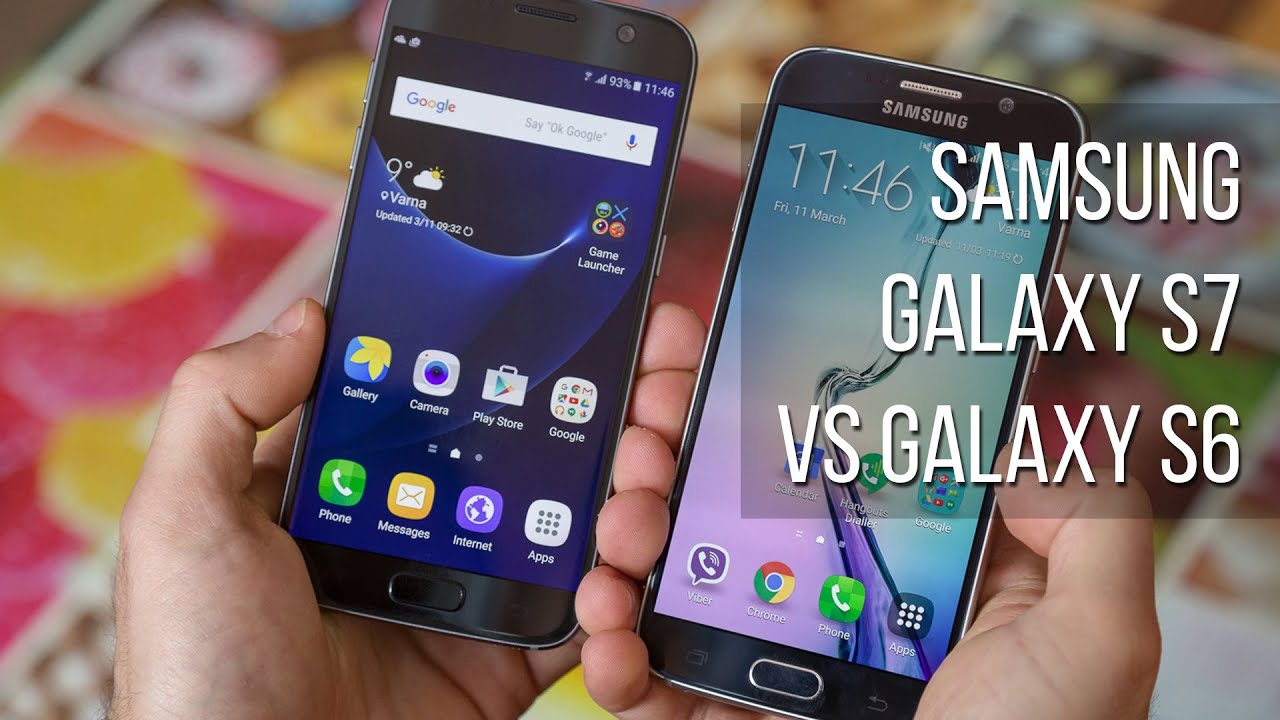
Samsung Galaxy S7 vs Samsung Galaxy S6

Introduction
Design
Solid improvements on the design front, with better ergonomics, water resistance, and less bulk.
If you were keeping tabs on the Galaxy S7 prior to the unveiling of the phone, you'll know that rumors were spot on. Like, 100% spot on.
In other words, what we were promised by leaksters is what we received—a very Galaxy S6-esque device, with a metal frame encircling the phone, and Corning Gorilla glass on both sides. Interestingly, though, that doesn't mean improvements weren't made, and most of them are immediately apparent.
Finally, it's worth pointing out that the glass rear of both devices is equally as welcoming to fingerprints and just general messiness.

5.61 x 2.74 x 0.31 inches
142.4 x 69.6 x 7.9 mm
5.36 oz (152 g)

5.65 x 2.78 x 0.27 inches
143.4 x 70.5 x 6.8 mm
4.87 oz (138 g)

5.61 x 2.74 x 0.31 inches
142.4 x 69.6 x 7.9 mm
5.36 oz (152 g)

5.65 x 2.78 x 0.27 inches
143.4 x 70.5 x 6.8 mm
4.87 oz (138 g)
See the full Samsung Galaxy S7 vs Samsung Galaxy S6 size comparison or compare them to other phones using our Size Comparison tool.
Display
Overall, the Galaxy S7's display is a great performer, but actually a bit of a disappointment after the S6.
With the 5.1-inch display of the Galaxy S6 already closing in on 600 pixels per inch, there was (thankfully) little reason for Samsung to keep on adding more. So, things have been kept the same, with the Galaxy S7 also sporting a 5.1-inch panel with a Quad HD (1440 x 2560) resolution. It's more than you'll ever need, at least unless you're really into virtual reality.

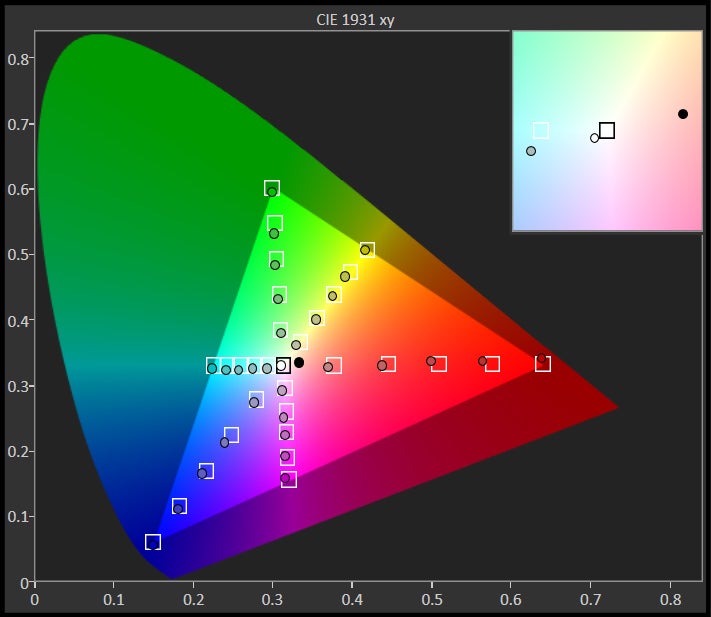
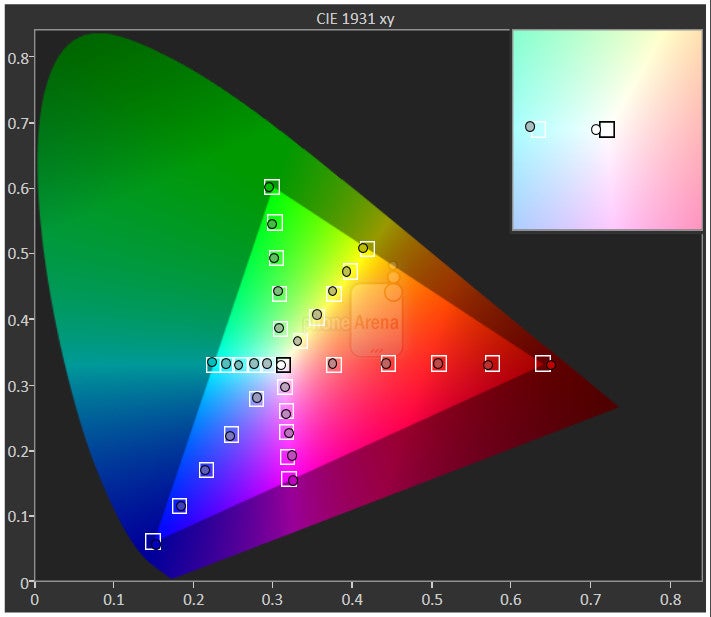
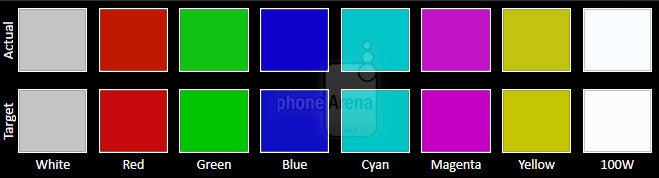
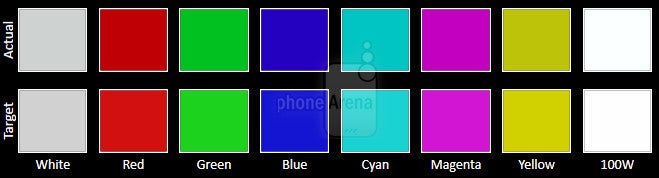
Examining the two devices within their most color-correct Basic mode, we first notice that the balance between the primary colors (red, green and blue) has changed, and whereas we had green in excess with the Galaxy S6, we now see blue dominate and red continuing to be underrepresented. In result, the color temperature has gone to the colder (bluer) 6850K versus the essentially perfect 6580K of the Galaxy S6.
Maximum brightness, too, has suffered, and is now sitting at just under 500 nits, compared to over 560 for the Galaxy S6. Legibility in direct sunlight, therefore, might be affected in extreme conditions, though we had no issues whatsoever ourselves.
Always On Display, as the name implies, means the screen of the S7 will always have something shown on it. There are a number of themes available for it already, and third-party developer access has been promised. In its simplest form, it means that you'll be able to glean the time and date, along with incoming notifications, without having to wake the screen. Since AMOLED displays allow for just a few pixels to be lit up at will, it follows that the Galaxy S7 won't consume too much power doing this. The phone is also smart enough to tell when it's inside a pocket or facing down, in which cases Always On Display will be... off.


Interface and functionality
Same ol', same ol'. Or well, almost.
Not much has changed with Samsung's flagship line as far as the underlying software is concerned. From a distance, it's the TouchWiz iteration that many of us have come to reference with Galaxy smartphones, but a closer inspection reveals a few changes—some more important than other.
Starting with the obvious, Samsung is moving to the Android 6.0 Marshmallow base with the Galaxy S7, and that means core features such as better app permissions management and Doze for improved battery management during idle times have been introduced. Interestingly, a new Samsung Labs submenu within Settings allows for some seemingly experimental features, such as the removal of the app drawer.
TouchWiz is running on top of Android 6.0.1 Marshmallow on the Galaxy S7
Finally, the Galaxy S7 is the first to debut the Samsung+ app, which will give users access to live tech support, including device diagnostics, tips and tricks, and "exclusive content, giveaways and special offers". Just what these last three might be is still a mystery, but we expect to find out soon.
TouchWiz on the Galaxy S6
Processor and memory
Qualcomm learned its lesson, and is back with vengeance.
The Galaxy S6 was a bit of a watershed event for Samsung last year, as it marked the first time in recent history where the company strayed away from Qualcomm's loving hands. Instead of offering a Snapdragon processor, the company finally felt its Exynos system chips were up to the task, and ditched the US-based silicon slinger. Not only did the Exynos 7420 prove capable, it actually outdid the flagship Snapdragon 810.
We're lucky to have both the Snapdragon and Exynos flavors at hand, allowing us to draw some conclusions about performance with both. In short, after some relatively in-depth testing, it's looking as if Samsung is being genuinely impartial, with both chips performing about the same.
Internet and connectivity
All your bases, covered.
As has become the norm, Samsung packages both its own Browser solution and Google's Chrome with its smartphones, and the Galaxy S6 and Galaxy S7 are no exception to this rule. Unlike most custom browsers, however, Samsung's doesn't altogether suck, and is actually a decent client with some neat built-in functionality like full page screenshots. Navigation throughout the web is mostly done without a hitch, with panning and zooming operations proving smooth enough.
On the connectivity front, much everything has remained the same. Both devices feature dual-band Wi-Fi 802.11 a/b/g/n, microUSB 2.0 for charging and mobile data (yes, no USB Type C), NFC, and Miracast. Both also offer Samsung Pay for mobile payments, and the company has promised significant regional expansion of the service in 2016. The only difference—for those who even care—is the transition from Bluetooth 4.1 to 4.2, which means nearly three times the data throughput.
Camera
An evolutionary step forward, not a revolution.
The theory behind Samsung's new 12 MP is sound. Instead of sticking with the 1/2.6”, 16-megapixel sensor available with the Galaxy S6, Samsung has moved to a slightly larger, 1/2.5”, 12-megapixel unit. Whatever is “lost” (read on) in resolution, however, is more than made up in our opinion through markedly larger, 1.4μm pixels (vs 1.12μm for the S6) and wider lens (f1/.9 vs f/1.7 for the S7) which mean better light sensitivity, and thus superior low light performance. Seeing as shooting in the dark has long been a pain point with smartphones, we consider this a smart move. For selfies, the Galaxy S7 retains the 5-megapixel unit.
Camera interface of the Samsung Galaxy S7
Camera interface of the Samsung Galaxy S6
Image quality
Without a doubt, the proposed benefits of the new optics and sensor are something that got us intrigued when we were first briefed on the Galaxy S7. Still, at the end of the day, it's just numbers, and that means we had to go outside and stage a shootout against the Galaxy S6 to understand if anything has really changed for the better.
Thankfully, on the whole, we've got to say that there's an improvement, though it's fair to say that you won't be getting a vastly superior shooter. The snapper of the Galaxy S7 churns out a bit more realistic shots, with less of a yellow overcast, and it does so with incredible speeds. That is, quite often, the Galaxy S7 will go for twice or higher the shutter speeds of its predecessor, while maintaining ISO about the same. In result, it proved better suited for taking snaps in imperfectly lit environments, where its predecessor would sometimes end up with a blurry photo. At the same time, the end result is an image that is just as bright—or even brighter—thanks to the wider lens and bigger pixels.
As for the dynamics of the snaps, it's harder to really call it at this point, and it's probably more of a stalemate, as the Galaxy S7 seems prone to obliterating highlights in some contre-jour compositions, whereas the Galaxy S6 maintains them to a degree. In other scenarios, the more yellowish photos of the S6 mean less visible clouds, not to mention a less natural sky that isn't as blue as with the S7.
At nighttime, we were a bit surprised by the snaps of the Galaxy S7, probably because we were expecting a noticeably superior low-light shooter. The reality, however, is that the photos in the S7's camera roll weren't that much different from those of the S6's. Indeed, photos come out about as equally bright, and it's not like you suddenly get all the details concealed in darkness pop up with the S7. That said, the new flagship does get the job done at faster shutter speeds (so lower chance of blur) and at lower ISO (less grain). The latter fact is important, as in some compositions it meant that very bright neon signs preserved their detail, whereas with the S6 they were a splotchy mess.
Overall, we felt that the Galaxy S7 delivers a bit more natural-looking images, and at much faster shutter speeds. If blur is a concern, then you can count on the S7 to remedy that, not to mention that focus in low-light environments is noticeably quicker and more precise. Still, if you were hoping for a markedly superior shooter in the S7, it's just not it. Instead, it's more of an evolutionary step forward than a revolution.
Samsung Galaxy S7 vs Samsung Galaxy S6 sample images
Video quality
Like the Galaxy S6, the S7 offers just about everything you'd expect from a flagship camcorder, including 1080p video at 30 and 60 frames per second, and 4K UHD capture at 30 frames per second. Slow-motion video is also available, along with a new Hyperlapse mode, which allows you to basically speed through very long recordings, but with the added benefit of proper software stabilization.
In terms of quality, we're hard-pressed. The Galaxy S7 does have the benefit of a better and quicker auto focus, especially at night, but otherwise quality is pretty much identical. At the same time—and quite surprisingly—we actually ended up liking the Galaxy S6's nighttime video more, as it wasn't as noisy. Still, focus struggled in comparison.
Samsung Galaxy S7 vs Samsung Galaxy S6 Sample Videos
Multimedia
Slightly weaker volume output than its predecessor, and comparable audio quality.
In viewing the Galaxy S6 and Galaxy S7 as on-the-go multimedia devices, pretty much nothing has changed within the year that distances them. Both offer comprehensive codec support for video watching through the native player, and enough real estate to make for a decent viewing.
Gallery apps
On the music front, we note near identical volume strength between the two loudspeakers. Power output measured at the 3.5mm headphone jack has improved a bit with the new flagship—welcome news, but still fairly disappointing compared to the best in the game.. Interestingly, the stock TouchWiz music player is gone from the S7, and so you have a choice between Google Play Music for local playback and Samsung Milk if you want to stream.
Call quality
We observed notable improvements with the earpiece and microphones of the Galaxy S7.
While most of us spend the majority of our time tapping away at the keyboard with our smartphones, call quality is still something we care deeply about. It's because of this that we're happy to see the Galaxy S7 offering superior performance compared to its predecessor.

More importantly, however, voices transmitted from the Galaxy S7 are notably cleaner than with the Galaxy S6, and pack a lot of tonal substance.
As for the loudspeaker, don't expect miracles, as even with the extra volume feature on, it's on the weak side. Sure, we can make out voices, but if there's a lot of background noise, you'll have to strain yourself to hear what's being said.
Battery life
Ay, ay, ay! Not what we were expecting at all!
The Galaxy S7 gained a millimeter or so in thickness in the transition from the Galaxy S6, but as mentioned, that wasn't random—the phone packs a significantly larger, 3,000 mAh cell, or a jump of 450 mAh compared to its predecessor. Given how the Galaxy S6 proved a strong contender overall in terms of battery longevity, we were expecting an even better showing from the Galaxy S7.

A bigger battery also means more time needed to top it off when you're all out. In our testing, the Galaxy S7 required 88 minutes to go from zero to full, while the Galaxy S6 gets the job done in 78 minutes. Despite the hike, the Galaxy S7 still is among the fastest charging phones on the planet.
Conclusion
There's time to wax poetic, and there's time to tackle the facts head on. And the facts are that the Galaxy S7 is an evolutionary step forward for Samsung, but no more. Sure, we're more than happy to see that the company has improved on ergonomics and that the handset is now dust- and water-resistant, but much everything else is very comparable to the Galaxy S6, or even slightly worse.
For example, the interface has only received some minor improvements. Yes, the Always On Display feature is a nice extra, but definitely not something that'll compel most S6 owners to upgrade. On top of that, the new, 12-megapixel camera isn't the breakthrough we were hoping for, even though it's still overall superior. And finally, while we're glad to see call quality has received some much needed attention, we were very disappointed to see that despite the larger cell, the Galaxy S7 actually posts worse battery life than its predecessor.
In closing, unless some of the above-mentioned features and improvements are just too good for you to pass on—and that would be in your view—there isn't much reason to upgrade just yet. Go get a nice stereo and a TV to go with it, and save your money for the Galaxy S8.

Follow us on Google News













Things that are NOT allowed:
To help keep our community safe and free from spam, we apply temporary limits to newly created accounts: