Pronto Review

Introduction
It’s highly acclaimed, superior performing, incredibly fast, and it also happens to even sport a pretty good looking design. Those are just a fraction of the iPhone’s qualities, as time after time, it’s been touted as one of the best phones around. While it’s not heavy on the specs sheet, Apple’s pride and joy has shown us that the experience supersedes everything else – and that’s what makes it so great!
- IR extension cable
- 4 AA alkaline batteries
- Quick start guide
Design
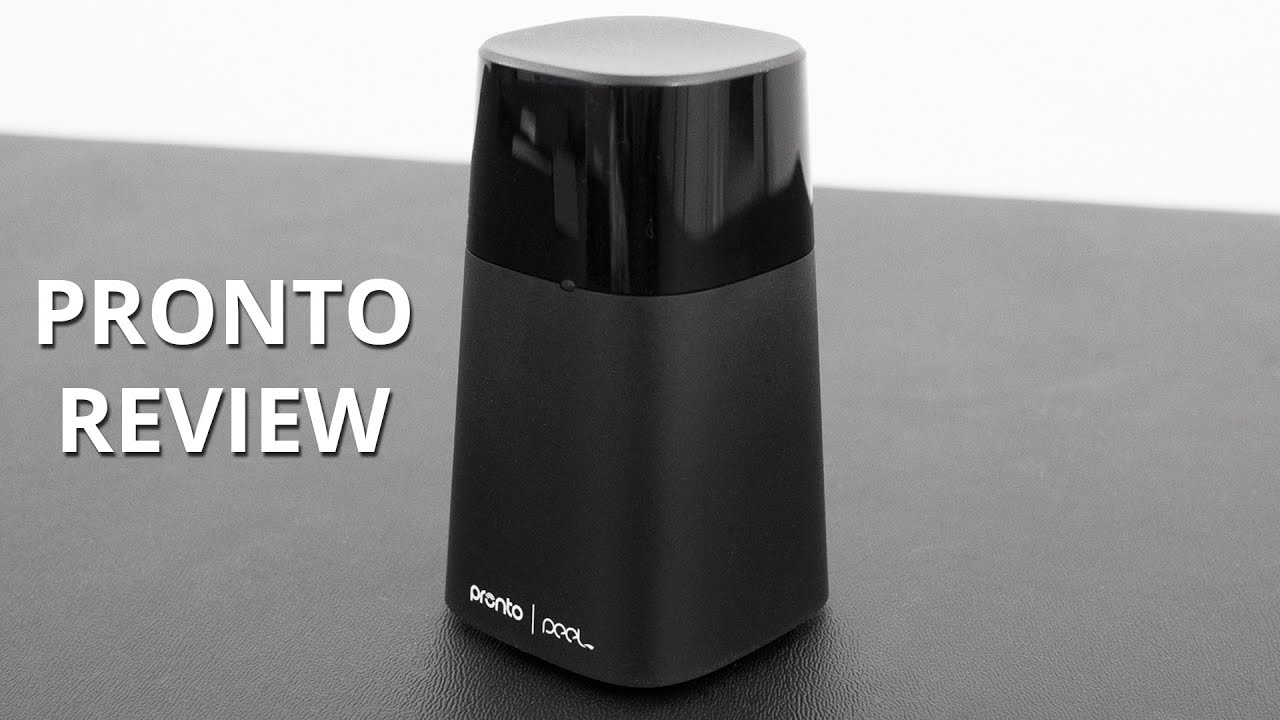
At its core, Pronto transforms your iPhone into a personalized universal remote control, doing away with some of the hassles of having to use several remotes. Its design is simple and minimalist, something that blends well with the assortment of furniture in your living room. Sporting a two-toned plastic construction, where the top compartment is glossy and the bottom being a matte finish, it doesn’t really scream anything magnificent or commanding with its design – it’s just meh.
While it’s bottom heavy to ensure it can’t be easily knocked over, there’s a bit of hollowness around the middle and top sections of Pronto. Around the front, there’s an LED light to indicate its connection status – while the rear accommodates its IR blaster and 3.5mm port that’s used by the optional IR extension cable. Naturally, its placement requires it to be within the line of sight of your television, cable box, AV receiver, and anything else you might have.
Peel Smart Remote app
The initial setup is a breeze, one that asks us who is our cable provider and the various devices we use (television sets, cable boxes, and much more). Once everything is complete, we can access the “watch TV” remote to simplify things by combining the various remotes into a single one to control out TV watching experience. Essentially, it combines the cable box and television remotes, so that its sends the necessary commands to the appropriate devices. If you happen to prefer using each of the dedicated remotes, you can do that as well, but that means having to constantly switch between them.
Connectivity
Relying on good old Bluetooth Smart connectivity, our iPhone 6 Plus is able to automatically pair the moment it’s within range – 25 feet maximum in our experience. Aside from that, there’s also the IR blaster that rounds out its connectivity set. As we’ve detailed, Pronto needs to be pointed in the direction of your home entertainment system, since it requires that line of sight to send signals. From what we’ve experienced, it’s pretty quick in sending those commands from our iPhone, to Pronto, and finally to the intended device.
Battery
Combining the 4 AA batteries powering Pronto and its Bluetooth Smart connection, it’s able to yield a maximum battery life of approximately 1 year – so claims the manufacturer. That’s certainly comforting, seeing that you’re not going to have to replace batteries frequently, nor does it require nightly charges if it were rechargeable.
Conclusion
Unless you’ve already invested in a sweet universal remote of some kind, it’s a little tough to justify the need to pick up Pronto. At $49.99, it seems innocuous enough to pick up for those who are frustrated with having to constantly juggle between remotes. Using Pronto eliminates the hassles that come with all of that, naturally, but you’ll need to be mindful about it requiring that line of sight to send commands.
It’s really straightforward in what it does, so you’ll have to convince yourself whether or not it’s something worth investing in. For us, it’s honestly a tough call because it’s a feature that’s nice to have with the iPhone, but it’s not a diehard thing.

Follow us on Google News









Things that are NOT allowed:
To help keep our community safe and free from spam, we apply temporary limits to newly created accounts: