Nokia N93i Review
- Phone
- Charger
- Computer connection cable
- TV /audio system connection cable
- Stereo headphones
- Carrying Pouch
- Hand Strap
- User’s guide
- Software CD
The soft carrying pouch is designed to protect the phone from scratching. It is considerably bigger than the phone itself, so the phone goes in easily and then the pouch is fastened with a string.
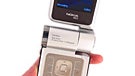
As was already mentioned, the phone has kept its predecessor’s unique form factor. It is basically a clamshell, but is display, rotating at 120 degrees, makes it a laterally-handled device with a landscape display and a front-panel camera.
Therefore, the two software buttons are dubbed over the main display. When it is turned around, e.g. in order to be used for taking pictures, the buttons remain in its upper and lower part. The landscape mode of the operating system has been optimized in the same way. The 5-directional navigation button is functionally dubbed by the joystick on the right-hand side. It is considerably smaller, but because it is jutting out, it is even more convenient to use. The camera mode and the flash buttons are also located there.
The central button has two press positions, because the phone’s camera is auto-focusing. By semi-pressing this button, the camera focuses and when the button is fully pressed, the picture is taken, just like a regular camera.
If we disregard the fact that the phone has two navigation faces (one for the phone and one for the camera), we can say that N93i is simply a big clamshell. Although it is downright SMALL, compared to N93, N93i is still in the big phones category.
Model | Dimension (Inches) | Dimension (MM) | Weight (OZ) | Weight (Gramms) |
Nokia N93i | 4.3" x 2.3" x 1.0" | 108 x 58 x 25 | 5,7 | 163 |
Nokia N93 | 4.7" x 2.2" x 1.1" | 118 x 55.5 x 28 | 6,3 | 180 |
Nokia N95 | 3.9" x 2.1" x 0.8" | 99 x 53 x 21 | 4,2 | 120 |
LG KG920 | 4.3" x 2.0" x 0.7" | 108 x 50 x 18 | 4,6 | 130 |
Sony Ericsson K810 | 4.2" x 1.9" x 0.7" | 106 x 48 x 17 | 4,0 | 115 |
Nokia N95 and Nokia N93i
It weighs 5.7 oz (163 g), which makes it one of the heavy phones on the market. Holding it is not a problem, unlike keeping it in your pocket. Forget about carrying it in your shirt pocket, for example; you should rather choose a pocket that is big enough to hold it and to bear its weight.
In order to stabilize the top shell, Nokia have taken the clever decision of making part of the rubber buffer (whose main function is to prevent the lids from slamming) enter into a slit, so as to avoid a horizontal gap. Just like with N95, the battery lid is perfect with no movement at all, but easy to remove. Under it you will find the BL-5F battery and the SIM card slot.

Camera lens
To the right of the camera inscription is the shutter button and the zoom ring; the camera lenses are to the left. They are covered by a Zeiss black protective lid. You have to remove it and slide it back every time, which did not appeal to us at all. It would have been much better if Nokia had used for some of its top models the standard lenses protection, which is automatically opening lens-cover. This type of protection is used in most of the compact digital cameras on the market.
Two flash LEDs are located on the phone’s left side, as well as an infrared-eye, Pop-up Nokia port with a lid and the small Nokia port for charging and loudspeaker. Almost always when taking pictures we put our hands over the flash and blocked it. We were also disappointed because a pop-up port was used, instead of a combination of a miniUSB and a 3.5/2.5 mm stereo jack, providing for the convenience to use a cable from another device for the synchronization, without entangling oneself with another one. On the other hand, the stereo jack would allow one to use standard headphones without interconnects.

2.44 inches display
The main display is 2.44 inches, a bit smaller than that of the N95. It features the same QVGA 240x320 pixel resolution and 16 million colors, which is the only upgrade in the specifications, compared to the N93. It is difficult to have any complaints here, provided that the images are colorful and contrasting and the high resolution, which is a standard for this size, ensures a detailed picture.

Home screen
The top part of the home screen displays a clock and the date, as well as the usual signal strength and battery, while the name of the carrier or Offline can be seen in the middle. The Offline tag indicates that the N93i works only as an “organizer” and multimedia device with the phone function switched off (that’s handy for using the smartphone during a flight). Just below these is located a row of 6 shortcuts which can be personalized to suit you best. The rest of the display, below them, is used for “notifications” – this is where missed calls, upcoming tasks (or To-Do in the calendar), received messages are displayed, as well as the music player status (the song that’s played at the moment). The various capabilities of this Active Desk can be set to serve you best. It resembles a well-personalized homescreen of a Pocket PC with Windows Mobile OS and is really useful and pleasant to use, and it saves a lot of time. Located at the bottom of the screen are the two software buttons which can also be personalized from the Settings menu.
All the contacts are displayed as a list and if there is a picture ID, it can be seen in the top left corner of the screen as a thumbnail with a very small size (it’s the same when you have an incoming call and that’s why we find this feature useless) when you select the contact. If you want to search, you type in directly from the keypad and searching is done for the whole name (not only the first word), even if the name is saved in more than one field (first and last name for example). If you want to edit a contact , you can only change the already defined fields. For adding more information you need to select the Add Detail menu. When adding a new contact you are provided with the “basic” fields, but with the “Add Detail” function you have almost no restrictions on the fields and their number and you can add a lot of phone numbers.
We also like having the option for adding a given field several times and in that manner for example we are able to record the numbers of three phones each one with a status “Mobile”.

The phone has a set of voice commands – they are speaker independent and you don’t have to “train” every command, something that can save you a lot of precious time. By holding the right soft key, the “recognizer” turns on and you can say a name (from the phonebook) to be dialed. Names like “Father”, “Brother”, “test”, “John” and “Neo” were no problem, but we had no success with others like “Amy” for example.
The commands can activate various programs or perform different functions, like “New SMS” for example, but a list with different capabilities must be added to the menu - not all of them are added by default so that they’re easier to recognize with any speaker – thus by adding only the ones you need you can achieve best possible accuracy without the annoying training. Аnd it works, the voice commands were very accurate and we rarely experienced mistakes when launching applications.

A voice recorder can record your voice by the means of speakerphone as the duration of the recording is limited only by the available memory. You can record on the memory card, which will allow longer recording times. In that way the smartphone replaces your voice recorder without needing a third party software.
The Organizer is spread into different submenus – the calendar is one of the icons in the main menu and it can be viewed by month or week. Of course, you can easily add notes to a particular day with a few clicks; To-Do notes are also displayed on the homescreen if the corresponding option is turned on (see Interface). An alarm can be assigned to each entry in the calendar.
The calculator is very simple and is not scientific one, which would suit a smartphone.
The World Clock is also located in this menu and you can add various cities that you like to view – that's very convenient and saves a lot of time compared to the standard way with “moving across the world map". You can easily review given cities, which you are interested in without searching them each time.
Messaging:
The Messages menu has nothing new to offer – you can easily compose SMS/MMS or Email and located in My Folder are templates which are handy for text that is often used in messages. The fast T9 can help you enter text quickly. The EDGE and UMTS connection help for fast retrieving of Emails.
Connectivity:

The phone has an IrDA port, located on the left side of the handset, and offers another option for connectivity with other devices, but it's an outdated technology and it's present in very few phone models these days, so we find it unnecessary.
In most contemporary phones it is completely replaced by Bluetooth. The N93i offers the latest version 2. It is an absurd that the multimedia A2DP and AVRCP profiles are not supported, which means that the N93i cannot transmit music through Stereo Bluetooth. This is probably a limitation of the OS versions and just another example why the N93i should run on v.9.2. As EDR (Enhanced Data Rate) is supported, you can transfer files to compatible devices at high speed (up to 3 Mbit/s) which is convenient when sending large files like photos, videos and music.
Nokia N93i also supports Wi-Fi (802.11b/g), which is a wireless network standard allowing access to the Internet at all hotspots (places with such kind of network), as well as usage of IP telephony via additional software. Through Wi-Fi you can also stream music or video fast (and free) to your phone, or download some new multimedia content. We used it for browsing the internet through the Web browser, for the Maps service and for streaming or downloading Videos from the Internet.
For over-the-air data you can connect through both 2G GPRS/EDGE or through 3G UMTS, but unfortunately the latter supports 2100MHz band only, which means it will work in Europe/Asia, but not in the US, where 850/1900MHz UMTS is needed. Unlike N95, the N93i doesn’t support HSDPA.
Like most other Nokia phones, along with the N93i comes a CD with Nokia PC Suite. The software has a nice interface with logically structured and easy to use menus, but the options supported are nothing special – here we have the standard backup and synchronize, connecting the PC to the Internet via the phone, managing contacts, messages, multimedia and applications. Even if you've never used Nokia PC Suite you won't experience any troubles working with it and establishing a connection between the PC and the phone would be no problem with the USB cable provided with the N95. When connected to the USB cable, you can choose which mode the N95 should enter in: Media Player, PC Suite, Mass storage, or PictBridge. PC Suite is the one we've described above, while the Mass storage is most suitable for transferring lots of images, music or videos from the computer to the phone or vice versa.
Thanks to the UMTS/HSDPA data (or the WiFi) and the QVGA resolution of the display, loading and viewing a standard HTML web pages is a pleasure. The phone has no problem rendering all pages and reading phoneArena's news was a pleasure. Scrolling left-to-right and top-to-bottom is done with the phone's d-pad, and a mini-map shows you, which part of the page you are looking at. The pages loaded pretty fast and as a whole, we had a great experience with the browser, so we definitely like it more than the Internet Explorer, built in Pocket PC phones based on Windows Mobile. The browser can load RSS feeds for even faster access to information.
What we loved about it is the history: when you use 'back' to see pages you've seen earlier, you see the pages as thumbnails, you can open from the phone's cache.

Camera interface
Nokia N93i is intended as an upper-scale cameraphone and camcorder with a rotating display and interesting form-factor. As well as its predecessor, N93, this is one of the few phones, featuring a real optical zoom, which in this case is 3x. This is neither too much nor too little, actually this is the most frequently used zooming factor for the pocket cameras and the down-market ones. Just like with the camera’s resolution, the rule here is „the more the better”, but Nokia have not made an effort to surprise us with an improvement compared with N93.
To use the camera, you have to turn the display in “camcorder mode”, because otherwise, even if you turn on the software, only the small 0.1 megapixels self-recording camera (the one for video conversations) will be switched on. Naturally, you’ll have to remove the black lid if it covers the lenses, because otherwise you will only see blackness. However, the software will not warn you of this, like in the case of active lens phones with cover like that of Sony Ericsson K800, for example. The landscape display is used as a viewfinder, showing the most important information (flash mode, resolution and number of photos left) and shortcuts to the settings.
Compared to N95, the settings here are nothing special! This is again entirely due to the outdated operating system. The flash settings are adjusted by a button, but options like „Self-Timer”, “Sequence mode”, “Light Sensitivity” (ISO), “Contrast”, and “Brightness” are simply non-existent. Shooting Modes, White Balance, Exposure Value Compensation and Color tones are available on the phone. Just like N93 and unlike N95, in close-up mode the autofocus is switched off and you have to work with a fixed focus which results in a poor quality of the pictures.
The quality of the pictures is average for a 3-mega pixel device and it does not live up to the advertisements for a ‘high-quality camera with Carl Zeiss optics’, just like N93, which performs even worse than N73, K800 and D900. Unlike N93, the i-version has a stronger noise reduction system and when viewing images at 100% you can see that the details are blurred, which is typical for most phones. Most of the pictures have good contrast and vivid colors and are well-exposed. When taking pictures of close-by objects, the lack of autofocus is noticed only when the pictures are viewed in large size.
Without Zoom 3x Optical zoom Macro

Camcorder interface
Videoing is really at a high level and sets a benchmark for other manufacturers. Just like N93 and N95, the video has a 640 x 480 pixels resolution with 30 frames per second, which allows for moving objects not to be choppy, which happens when you video with 15 frames. Only the digital zoom can be used when videoing, which has again a very negative impact on the quality of the image and therefore we recommend that you do not use it. Without the zoom, the quality is very good for a phone and quite similar to that of a pocket camera, although the quality of the detail is lower due to the compression.

Gallery

The Multimedia key opens a dedicated menu, which has shortcuts to various applications, with the Music, Radio, Web and Slide Show by default (they can be defined by the user). On N73 it pops up with animation which was boring to wait, and now N93i fixes this issue with NO animation at all.
The phone comes with headphones in the box, but can also play the music through its single mono speaker, which should be cool for the incoming ringing alert but actually isn’t. The sound through it cannot be compared to N95’s as it is not detailed and pretty weak. If you put your hand over the openings, the sound will almost mute. The interface of the music player is the same as those used in other Symbian S60 9.1 phones (N93, N73, E50). It's not quite comfortable – moving through the options can only be done with up and down directions and the buttons are so small that you have to stare at the display if you want to see what each of them does which is a total waste of space and resolution.
The sound quality of the music player is not the one we'd like to hear in a high-end multimedia phone … neither from the phone's speaker(it sounds awful), nor from the stereo headphones, which also produced almost no bass and had low quality of middle and high frequencies – unfortunately it is hard to connect decent hi-fi headphones to the phone, and you have to search for Nokia adaptor (Pop-up Port to 3.5mm jack). It's sad that it is not in the box, as it is with Sony Ericsson Walkman phones and LG Chocolate KG800. As you can expect, the built-in equalizers don't help for the sound quality at all but if you are fan of them, you can even add your preset one.
The FM Radio (and Visual Radio) comes as a bonus. It has a standard Nokia interface: you wouldn’t call it beautiful, but it is convenient. It can memorize up 20 stations with their names.
Software:
The phone can use applications based both on the Java platform and Symbian S60, which provides wide 3rd party software compatibility like any other smartphone. Installation is a piece of cake, while additional programs increase the software's capabilities very much and thus it can be personalized to better suit you. The phone comes with several applications, as well as a game, called Snakes, which is a 3D version of the well known from other Nokia phones game. The other game is just DEMO and is 3D racing game called SRE but the demo doesn’t allow you to play even one stage.
N93i has 50MB of internal memory and you must expand it with a miniSD card to take advantage of the phone's functionality.
Performance:
Although generally the smartphones are much slower than regular phones, which do not avail of a smart OS, N93i can well be called fast. Thanks to the sophisticated TI OMAP 2420 processor and the Arm 11-based CPU, N93i is one of the swiftest Symbian Nokia smart phones, together with N95. Still, some delay is felt when opening specific menus, but this is typical for the system.
‘Strong signal’ is a synonym for Nokia and therefore it is disappointing that this is not true for N93i. In our tests, which we carry out underground, we found out that, although big in size, Nokia’s top model performs below the average when we compare it with other tested models of all classes.
Typically for Nokia, the sound produced by the phone is good, as a whole, although a bit strange. The outgoing sound is clear, pure and strong at the same time. You can hear the other party very well, but the voices are slightly shrilly due to not perfect low frequency reproduction. If you turn up the volume to the maximum some sounds are reproduced with great peaks, which feels like hissing.
We were surprised at the performance of the speakerphone, which is definitely more advanced, compared to all other models that we have tested. The microphone manages to transmit our voice from about 9 feet (3 meters) distance so that we can be heard at the other end. Naturally, the quality is not perfect and the voices are not so clear, but they are understandable. The loud-speaker, which is not adequate for listening to music, is good enough for reproducing incoming voices during conversation, although there is more to be desired as to its purity.
Conclusion:
We started this review, pointing out that N93i comes with a smaller size and a much better vision, compared to its predecessor, but, unfortunately, ‘that’s all, folks’! The functionality has not been changed at. Some say ‘better late than never’, but we are not sure that this is true for N93i. If it had been launched years ago, before its bigger brother, it would have definitely been a success with its 3 megapixels and optical zoom, but since the smaller N95 with the same quality video, 5-megapixels, GPS and the new improved operating system is on the market, we do not see the point of buying a N93i, which is actually a N73, equipped with WiFi, optical zoom and VGA video. Its niche has already been occupied by the N95 smartphone, with the only comparable disadvantage is the lack of an optical zoom. N93i’s shortcoming position it in the past, rather than in the future, where N95 is. What would have justified the launch of this phone would have been an exceptionally good camera of over 5 megapixels. But since the phone does not feature such camera, its group of potential buyers would be rather small.

Follow us on Google News








Things that are NOT allowed:
To help keep our community safe and free from spam, we apply temporary limits to newly created accounts: