Microsoft Lumia 950 Review

Introduction
Would you believe that it’s already been 5 long years since Windows Phone 7 launched? Back then, we saw several manufacturers jump on board in producing devices that showcased Microsoft’s mobile platform, but their impact on the market was marginal at best. Fast forward to the present day, and we only have a single entity leading the way – Microsoft itself.
- Wall Charger
- USB Type-C to USB Type-A cable
- Getting started guide
- Warranty Information
Design
It looks more like a prototype than a finalized product.
We’re a bit perplexed with the final decision regarding the handset’s design, mainly because the handset lacks the style and premium workmanship that many other phones of this class exude. It looks more like a rough, first-round prototype than something that has been meticulously eyed over. Seriously, Microsoft could have opted for a more attention-grabbing look, considering that design is what helps in gravitating prospective buyers to a particular device. The choice of materials, in particular, is what gives the Lumia 950 the feel of a lower-grade Lumia model. With its matte plastic body, one that’s offered in white or black, the phone lacks the visual appeal and substance to attract people – it feels somewhat hollow. Unlike previous phones like the Lumia 1520 or 930, with their stylish and angular designs, the 950 simply comes off dull and boring. It is not all bad news, however: in the hand, the handset feels lightweight and comfortable to hold. But in all fairness, if we’re to peruse the phones on display in a store, we’d certainly overlook the Lumia 950 because of its subdued presence and underachieving design.

5.71 x 2.88 x 0.32 inches
145 x 73.2 x 8.2 mm
5.29 oz (150 g)

5.79 x 2.86 x 0.31 inches
147 x 72.6 x 7.9 mm
4.80 oz (136 g)

5.65 x 2.78 x 0.27 inches
143.4 x 70.5 x 6.8 mm
4.87 oz (138 g)

5.86 x 3 x 0.39 inches
148.9 x 76.1 x 9.8 mm
5.47 oz (155 g)

5.71 x 2.88 x 0.32 inches
145 x 73.2 x 8.2 mm
5.29 oz (150 g)

5.79 x 2.86 x 0.31 inches
147 x 72.6 x 7.9 mm
4.80 oz (136 g)

5.65 x 2.78 x 0.27 inches
143.4 x 70.5 x 6.8 mm
4.87 oz (138 g)

5.86 x 3 x 0.39 inches
148.9 x 76.1 x 9.8 mm
5.47 oz (155 g)
Compare these and other phones using our Size Comparison tool.

Display
Finally, a Windows-powered phone enters Quad HD territory!
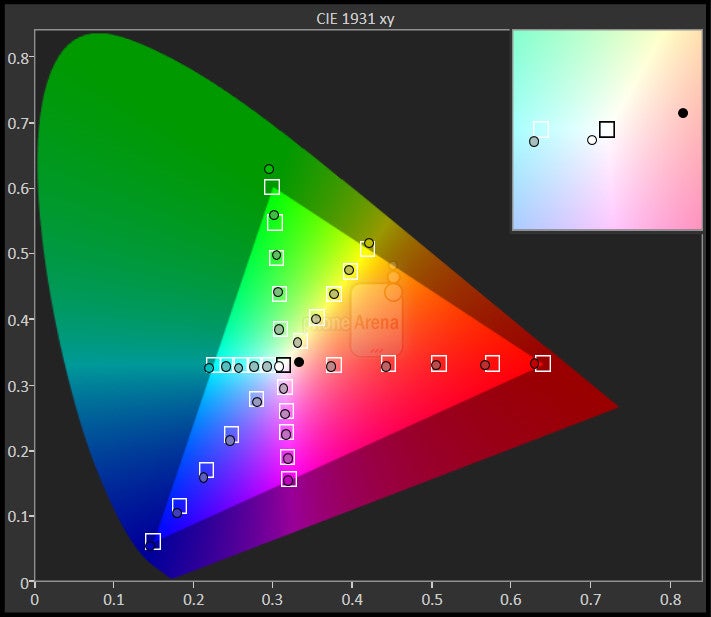
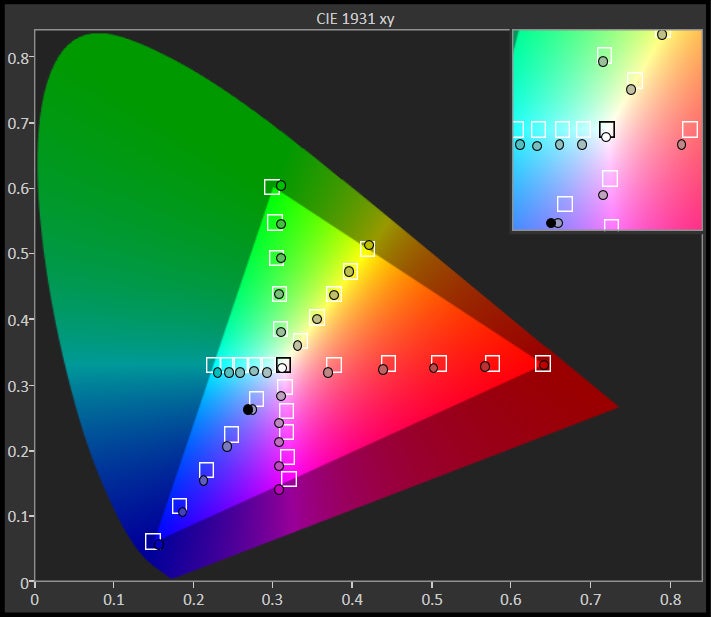
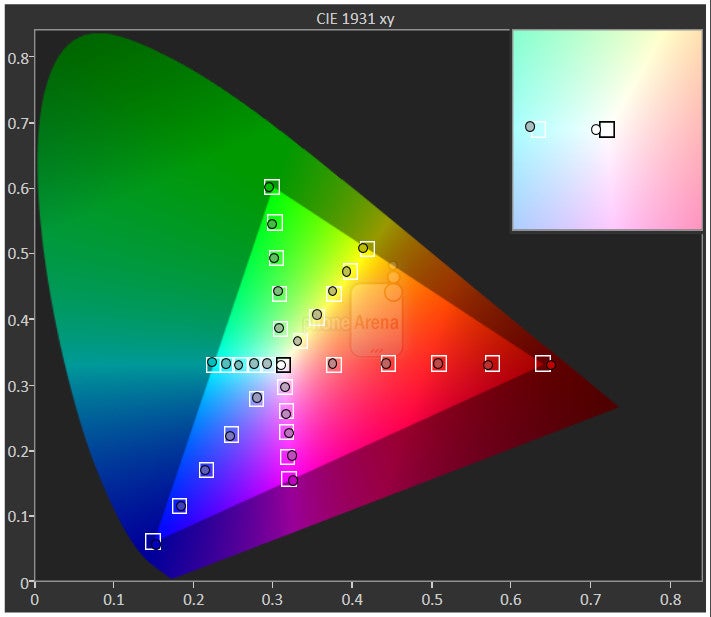
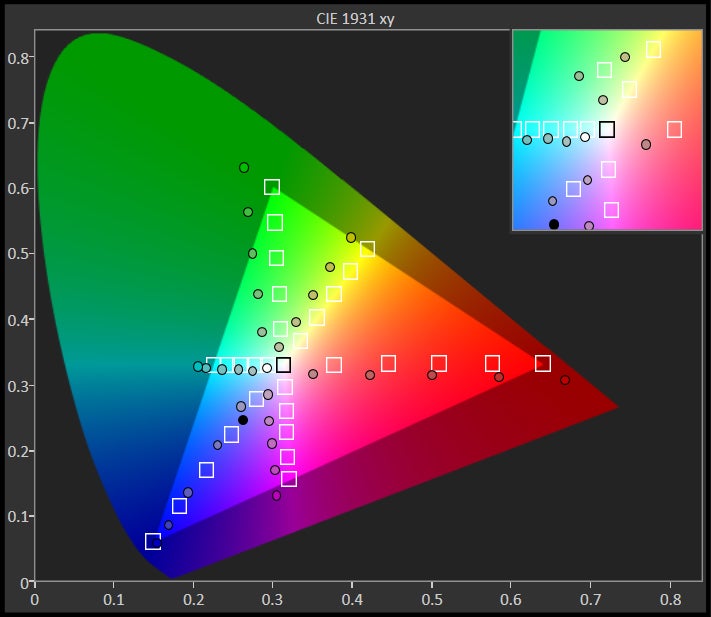
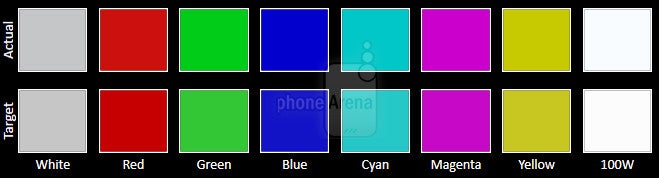
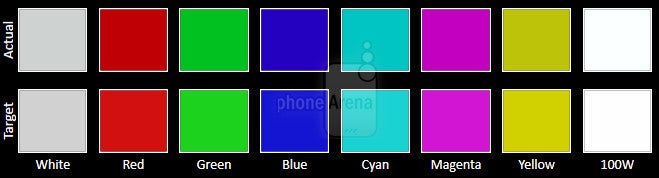
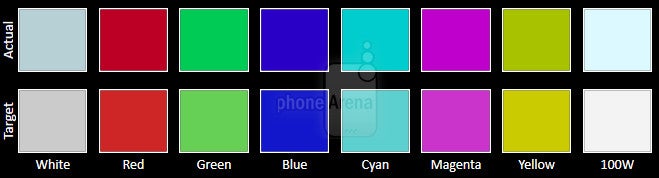
At long last, Windows on mobile has ushered into the Quad HD era, and we’re gladly accepting of this reality. Keep in mind, though, that there’s really nothing that warrants the Lumia 950 more adulation over its rivals because Quad HD resolution been in circulation for quite some time now. With the Lumia 950, we’re given a 5.2-inch, 1440 x 2560-pixel AMOLED display with the reflection-reducing ClearBlack technology. Certainly, there’s no shortage of details with the screen's pixel-crushing 564 ppi pixel density.





Interface and Functionality
Windows 10 makes an evolutionary leap with Continuum.
Windows Hello
Okay, the phone might lack a fingerprint sensor, but Microsoft offers its own alternative for unlocking the Lumia 950 – it’s called Windows Hello. Based on iris scanning technology, a red-colored LED light on the front of the phone turns on and works in conjunction with the front-facing camera to authenticate us. It work quite well, especially when we improve the recognition by running the process through several different light sources.
Continuum

The Display Dock accessory
Messaging
We’ve always been fond with the typing experience on a Windows Phone, so we can continue saying the same thing here with the Lumia 950. The layout hasn’t changed all that much, as well as its responsiveness, prediction, and auto-correct functionality, but now there’s this green dot on the keyboard that allows us to precisely place the cursor. The implementation works rather well, and beats having to finagle trying to position the cursor ourselves with our finger.
System Performance
It’s quick and responsive, but apps have a notorious way of constantly refreshing.
Very few Windows Phones in the past have been regarded as high spec’d when they’re compared to their Android counterparts. Sure, there are a few that certainly qualify, but the vast majority didn’t need to be, just because Microsoft has one optimized platform already. As for the Lumia 950 in particular, it’s sporting some agreeable hardware – a hexa-core 1.8GHz Qualcomm Snapdragon 808 chipset that’s accompanied with the Adreno 418 GPU and 3GB of RAM.
Camera
The camera reputation is intact with the Lumia 950, but we’ve seen better performing stuff already.
Lumias have been notable for their photo-taking abilities, so the reputation is unchanged here with the Lumia 950. The phone is endowed with a 20-megapixel, 1/2.4” camera sensor with Zeiss optics. This particular configuration breaks down to a 6-element, f/1.9 aperture lens, optical image stabilization, BSI, and an unprecedented triple LED flash. It’s also quite diversified with its video recording package, offering us all sorts of resolutions consisting of 720p, 1080p, and UHD 4K at various frame rates.
The camera interface hasn’t changed a bit, which is both good and bad at the same time. Over on the good, its interface is still a favorable one because of the tight manual controls it offers – giving us access to white balance, focus, ISO, shutter speed, and exposure adjustment. Conversely, however, we’re still required to install various ‘lenses’ for additional shooting modes. While it boats the lines’ signature Rich Capture mode, an HDR of sorts, it doesn’t have a native panoramic mode.
Image Quality
Much like the vast majority of quality phones out there, the Lumia 950 dishes some pleasant-looking shots when the lighting conditions are ideal. But the details that it captures aren’t as clear as what some other cameras produce, despite its 20-megapixel count. Also, colors tend to be a bit oversaturated, giving the image an unrealistic look.
Well, that unnatural effect becomes more profound when we switch over to its Rich Capture mode. To be fair, though, it’s able to cast an even exposure throughout the shot, so that shadows and highlights are well-represented, but in doing so, there’s a significant boost to its color saturation and contrast. The end result looks more artificial than anything, since photos tend to have a pronounced glow to them due to the post-processing.
Under low light, the Lumia 950 undoubtedly has its strong characteristics. At the very least, the increase in exposure helps to draw out details – while digital noise is thankfully minimized in the process. For low light scenes that have a lot of movement or action, there’s a higher chance of photos coming out blurred due to the longer exposure. Regardless, we’re satisfied with its performance. The triple LED natural flash also lends its usefulness in giving shots balanced lighting, without having too much of an overpowering presence in the shot.
Microsoft Lumia 950 sample images
Video Quality
The Lumia 950 performs well when recording video in settings with ample lighting. Naturally, UHD 4K delivers the best results when it comes to details, as its 1080p samples appear a bit softer toned, but its exposure adjustment tends to be a bit too sensitive all around. Audio recording is decent, but the phone has troubles with wind reduction.
Under low light, there’s more presence of noise in the footage, and when you combine that with its smudgy details, it doesn’t really make for a compelling performance. Still, the built-in optical stabilization manages to keep things steady.
Microsoft Lumia 950 Sample Videos
Multimedia
Same old, same old.
Sporting a fairly large AMOLED panel with good color reproduction, the Lumia 950 makes for an ideal choice when it comes to watching videos – especially how videos just come to life thanks to the qualities of the screen. But while it’s more than capable of playing all sorts of resolutions and codecs, Windows 10 still lacks that multi-tasking element wherein videos can be ‘minimized’ and overlaid over whatever else we’re doing on the phone.
By now, any Windows user will know that music playback is by default handled by the Groove Music app, which not only allows us to play native content on the phone, but also streaming content courtesy of Groove Music Pass – a subscription service very much like all the others out there. Visually and functionally, it doesn’t deviate from what we’re exposed to on rival music players.
Having only a single speaker, positioned next to the camera lens, it musters up a respectable 76.5dB of audio power. The quality is easy on the ears, as it churns out enough substance at the loudest volume without sounding strained. Fortunately, if its default quality isn’t to your specification, it can be fine-tuned by adjusting the equalizer in the phone’s settings – it’s not accessible through the Groove Music app regrettably.
Battery
Although it’s an average performer with its battery life, it’s the fastest-charging Windows based smartphone to date.

Using the included USB Type-C wall charger, the Lumia 950 coughs up a better-than-average recharge time of 93 minutes – making it the fastest charging Windows running smartphone we’ve come across to date. That tally also rivals many of the greats around right now, like the Motorola DROID Turbo 2 and Google Nexus 5X, but it’s been blessed with wireless charging as well. Therefore, any Qi compatible wireless chargers will work with it.
Conclusion

Essentially, it’s a bridge smartphone to help tide them over in the meantime, until something bigger, more ambitious comes to fruition. At the same time, the Lumia 950 could be a suitable device for those who are looking for a different experience or those who are just making the move to a smartphone.
On the downside, the phone's price point and exclusivity with AT&T mitigates its potential in being a top contender in the space. Out of the gate, the Lumia 950 carries an outright price of $598.99 – or $149.99 with a 2-year contract through AT&T. Granted it has the specs sheet to warrant its price point, the design surely makes it feel underwhelming in comparison to other phones in the same caliber.
In addition to its pricey cost, its exclusivity with AT&T won’t help Microsoft spread the good word about its new Windows 10 experience. That’s a huge limitation considering the customer base it’s missing out on by not being available on other carriers. All of this again paints to a picture of it being a tide-over device, something that only diehard Windows fanatics will appreciate.
Don’t get us wrong, it has the specs and performance to satisfy buyers who have been heavily invested in the Windows ecosystem, but it’s just not that halo Windows 10 smartphone that can compete with the likes of the iPhone 6s, Galaxy S6, or Nexus 6P – it just isn’t. We’re really impressed by what Microsoft is doing with the platform and with Continuum's functionality, but we surmise that something bigger, more flagship-worthy will one day or another come to light. This isn’t it, that’s for sure.
Software version of the review unit: Windows 10 Mobile
OS build: 10.0.10586.0

Follow us on Google News







Things that are NOT allowed:
To help keep our community safe and free from spam, we apply temporary limits to newly created accounts: