Google Daydream View VR headset Review

Important note: The following is our legacy review of the Daydream VR headset, but in 2023 it's best to consider getting something like the Quest 2 instead, or one of the other, more current options on our best VR headsets lists.
Introduction
Ever since humanity first developed the moving picture, we've been trying to create more and more immersive experiences. Sound and color sure helped a lot, but for all the advancements that have come since, we've been stuck in this rut where it still feels like we're passively staring at a screen, rather than losing ourselves in new worlds. For the past few decades, computer science, hardware, and media experts have been working to take us to the next level, teasing the allure of virtual reality.

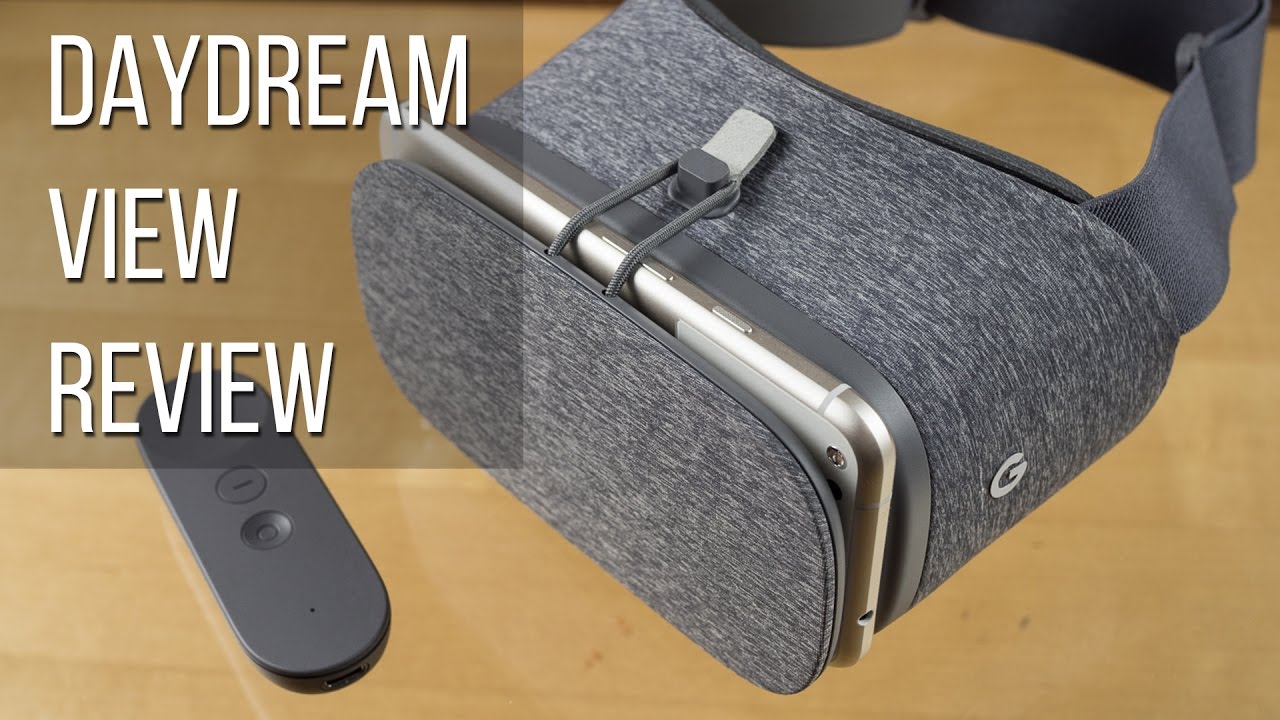
Core to the Daydream experience is the Daydream View headset and its wireless controller, which interface with compatible phones to transport their users into Google's new virtual world. We've been spending some time with Daydream View and the Pixel XL handset to get a feel for exactly what that has to offer; is this the smartphone VR experience to end all smartphone VR experiences? Let's take a look.
Design

Past VR viewers for smartphones have run the gamut of complexity, and their presence on the market afforded Google the opportunity to make some tricky decisions about where its own next product should fall on that scale. Instead of trying to win the VR race with the highest-end hardware imaginable, pushing past the Gear VR in terms of headset features, Google's instead settled on a middle ground, with a viewer a bit more advanced than Cardboard, but still lacking many of the Gear VR's extras.
Of course, to use Daydream View you'll also need a compatible phone – and this isn't like Cardboard where you can just pop any old smartphone in. Right now the official list of Daydream-enabled phones includes just Google's own Pixel phones, as well as the Moto Z series of handsets – though we've already heard other manufacturers promise Daydream compatibility, and Google confirms that more are on the way.
Interface and Content
As VR platforms mature, developers are realizing that users don't want to be constantly jumping in and out of their VR worlds as they navigate between apps, and it's becoming more and more critical to build your VR platform around an in-world hub. For Daydream, Google does that by by presenting a stylized, polygon-filled bucolic outdoor setting. It's bright and inviting, and is the backdrop in front of which you'll access Daydream's virtual menus.
All this interaction is performed through Daydream's versatile controller. Unlike other VR platforms where look-to-point is the dominant means of navigating their menus, Daydream has the distinct advantage of its wireless controller. The lightweight accessory offers multiple avenues of control: you can use its position-sensing capabilities to employ it as a pointer, or twist and turn it for motion control. Or for navigating on-screen menus, its built-in touchpad is there to help. This one is used more for gesture interactions – swiping to scroll, and that sort of thing – rather than pointer control like on your laptop.
With Daydream still new, the selection of apps taking advantage of the hardware is still a little limited, but Google's got some serious muscle behind its latest VR effort, and we're already seeing the emergence of more and more high-quality titles from major devs – like EA, which just released the new Need for Speed No Limits VR for Daydream.
Initial setup
Experiences
Using Daydream View with the Pixel XL and its top-shelf hardware makes for a great combination. The high-res screen looks fantastic, and while you can still make out individual pixels, by this point of using phone-based VR, we're learning to just sort of block them out – and here, they really are small enough that it doesn't require much in the way of conscious effort. Better still, the phone's bleeding-edge Snapdragon 821 processor delivers impeccably smooth video output. While there was the odd skip here and there, the hardware does an admirably solid job at keeping up with software demands. And with the timing between movement, app processing, and graphics rendering so fundamentally critical to a good VR experience, we're very pleased things work as well as they do.
At least, that's the case with the headset and software; what about the other key component to Daydream View, the wireless controller?
The controller
But that said, it suffers from a pretty expected failure for a motion controller of this type: since it determines its location in 3D space based on relative movement and doesn't have a fixed external point to use as a position reference (like the camera-based systems for the HTC Vive and Oculus Rift), it tends to drift over time: at first you're pointing straight ahead, but after a few minutes of gameplay, holding the controller in the same position now shows it pointing out over to the side.
Google's well aware of this limitation, and makes it easy to correct: simply look forward, point the controller straight ahead, and hold its dimpled circle button for a second. This performs a calibration that both centers your display, as well as centers the controller's position.
That step works really well, but you'll find yourself needing to call on it far too frequently. Compounding that annoyance is the effect it has on gameplay. Let's say you're playing that new Need for Speed game, where you use the controller to steer, twisting it left and right. All's well at first, but over time you may find “straight ahead” migrating from pointing the controller dead forward, to aiming it off to the side. But in order to recalibrate, you'll need to hold it straight ahead again – and unless you're super-fast at doing that, you're liable to crash your virtual car in the process.
While that sort of “integration drift,” as it's known, may be inevitable, it's less of an issue with some apps than others. Those of the “point and select” variety are a lot more forgiving than those where the controller's position is used in real-time to control app mechanics.

Side illumination can sneak in
Are we being too hard on Daydream? Maybe. The experience is a hell of a lot more polished than with Cardboard, but when we're talking VR, we've got high expectations. The technology's getting to a point where it's easy to say, “this is how things are supposed to work,” and even easier to dismiss products that miss the mark. But that would be doing Daydream a disservice; it's a strong follow-up effort from Cardboard, and improves on its predecessor in nearly every way. But you're still better off going into this eyes-open, and aware of exactly what you stand to experience.
Battery Life

Using a Daydream app takes a toll on your smartphone's battery just like running any other GPU-intensive title will. Daydream doesn't seem to place excessively high demands on the battery, but it's certainly not going easy on it, either. And if you intend to put in any appreciable amount of time plugged into Daydream's virtual worlds, you're going to want to make sure your phone's battery has plenty of juice left in it.
From within the Daydream settings screen you can view your phone's current charge, letting you keep an eye on roughly how much more VR time you have left before needing to recharge.
The much more frustrating situation concerns Daydream's wireless controller. It charges over USB Type-C, and Google doesn't include a charger in the box. That part, at least is fine – we don't really need an excess of chargers cluttering up our lives unnecessarily. The annoying part involves keeping a tab on the controller's charge level. While the in-headset view lets you check on your phone's charge, there's no similar indication for just how much battery life remains in the controller itself. You'll get an on-screen notification when it's getting particularly low, prompting you to plug it in for a charge, but if you'd rather stay ahead of the game and preemptively top it off, you're going to have to do so blind; there's no obvious way to determine controller battery status.
Price and conclusion

Daydream takes an approach to smartphone VR that's not quite like any other solution out there right now. On one hand, Google's made it quite simple and straightforward, opening the door for compatibility with lots of handsets – a move that made Cardboard the success it's been. But at the same time, Google's setting some standards to make sure that the Daydream experience is a relatively high-quality one, and part of that means that – for the moment, at least – the list of compatible devices is quite meager. That situation will improve, but for the time being it legitimately is a real limitation.
But Google's also made decisions that give Daydream a real technological advantage over its competition, and a standard wireless controller that all users can be expected to have access to really gives developers the support they need to create interactive software of a sort that has failed to materialize with either Cardboard or the Dear VR.
At $80, Daydream View feels about a million times more expensive than Cardboard, but you're getting a nice amount of hardware for your money. Investing in a really nice Cardboard headset would already set you back a lot more than some cheap fold-together unit would run you, and when you consider that you're also getting a wireless controller here, the expense starts to feel worth it. And considering how Samsung's Gear VR costs $20 more – without a controller – Daydream view comes across as a comparative bargain.
It's not just the hardware though (and don't forget the expense of a compatible phone): you also need to buy apps. Just like on the Gear VR, they can really add up fast, as VR apps tend to go for a premium over traditional 2D titles.
Right now, it would behoove any curious potential Daydream View user to do the math: look at how many of the current crop of Daydream apps you're really interested in, and what you're willing to pay for them. Sure, $80 for the headset and controller may be doable, but will you also be dropping a good $75 on apps? A little early budgeting will help you decide if Daydream's right for you.
If you do decide to splurge, you'll likely find yourself solidly entertained. Daydream's off to a decent start, and there's tons of potential for new hardware and software pushing things even further; we can't wait to see what killer Daydream View experiences become possible with the upcoming 2017 roster of flagship phones.

Follow us on Google News









Things that are NOT allowed:
To help keep our community safe and free from spam, we apply temporary limits to newly created accounts: