BlackBerry Motion Review

There was time, not too distant in our technological past, when the word “BlackBerry” was practically synonymous with “smartphone” – or, at least, cell-connected PDA. And while nowadays you're more likely to find someone using the words “iPhone” or “Galaxy” in that regard, the BlackBerry name still lives on, continuing to evolve and adapt to a changing mobile landscape.
In the box:
- BlackBerry Motion
- USB Type-C to standard-A cable
- Fast charger
- Earbuds (w/ alternate tips)
- SIM tool
- Quick-start guide
- Welcome sheet
- Warranty sheet
Design
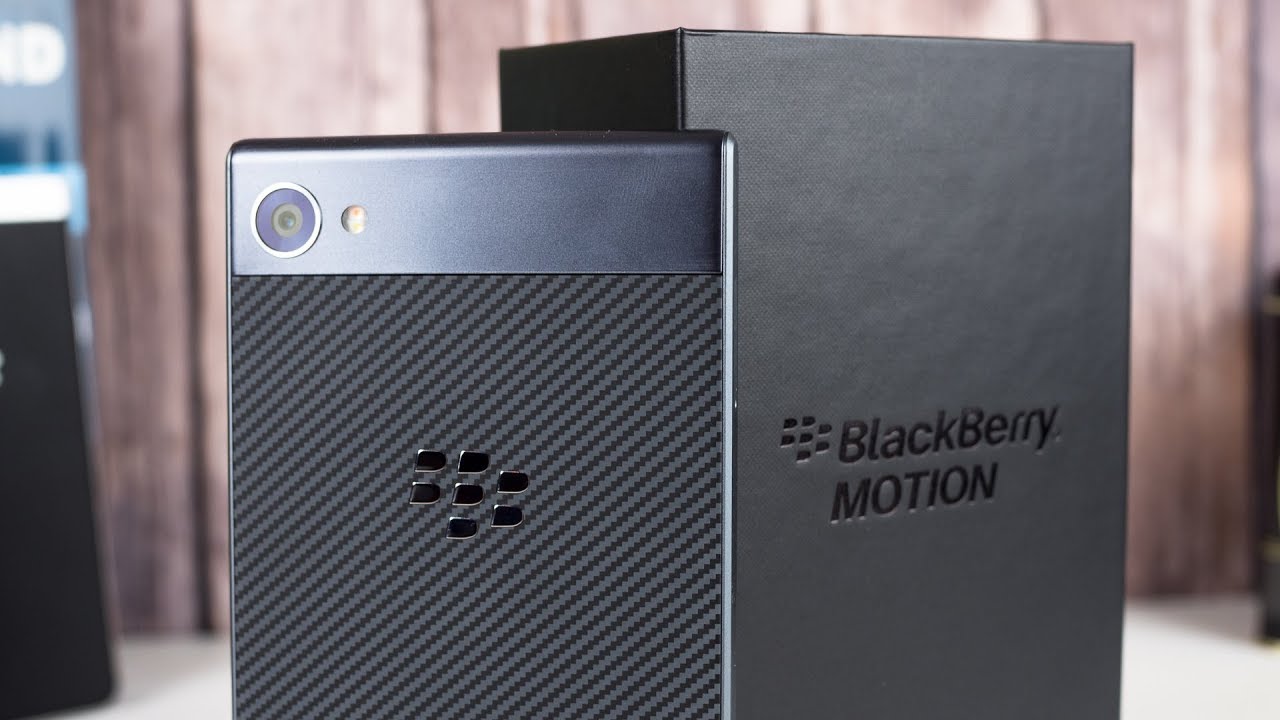
A smart-looking, metal-bodied handset ushers BlackBerry into the water-resistant-phone club

While BlackBerry models like the Priv and more recent KEYone have featured some very unconventional designs, the Motion would find itself much more at home with the rest of the Android pack. The full-touch layout drops any hint of a hardware keyboard, and instead goes with a largely traditional construction.
The whole package is comfortably thin, coming in just over 8mm thick. There's also IP67 water resistance this time around, which is a nice bonus we missed when dealing with a mechanical keyboard.
Maybe the only weak part of the BlackBerry Motion's design is its home button. The fingerprint scanner within works alright, but the button itself doesn't feel great. On our unit, it didn't feel like the home button was quite parallel with the rest of the phone's face, with the bottom edge sinking in deeper than the button's top edge. It's just a little thing, but with how often you'll be pressing the button, still something you might find yourself frequently thinking about.

6.13 x 2.97 x 0.32 inches
155.8 x 75.5 x 8.12 mm
5.89 oz (167 g)

5.87 x 2.85 x 0.37 inches
149.1 x 72.4 x 9.4 mm
6.35 oz (180 g)

5.84 x 2.89 x 0.31 inches
148.35 x 73.5 x 7.99 mm
5.75 oz (163 g)

5.87 x 2.87 x 0.32 inches
149.09 x 72.9 x 8.1 mm
5.01 oz (142 g)

6.13 x 2.97 x 0.32 inches
155.8 x 75.5 x 8.12 mm
5.89 oz (167 g)

5.87 x 2.85 x 0.37 inches
149.1 x 72.4 x 9.4 mm
6.35 oz (180 g)

5.84 x 2.89 x 0.31 inches
148.35 x 73.5 x 7.99 mm
5.75 oz (163 g)

5.87 x 2.87 x 0.32 inches
149.09 x 72.9 x 8.1 mm
5.01 oz (142 g)
Compare these and other phones using our Size Comparison tool.
Display
Oversaturated colors aside, BlackBerry gives us a pretty bog-standard smartphone screen

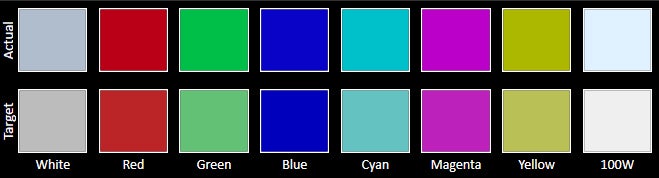
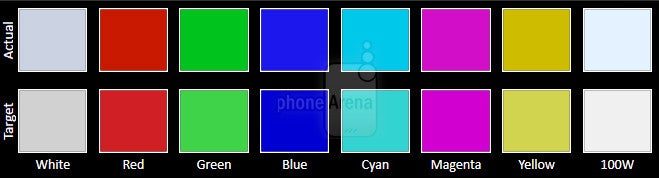
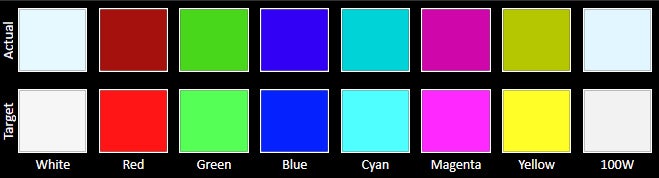
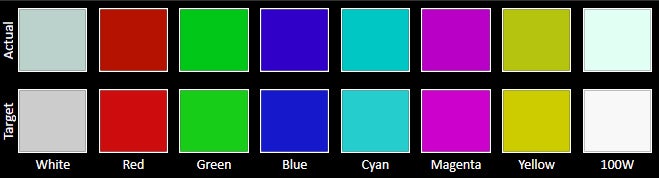
The BlackBerry Motion has a fairly nondescript 5.5-inch LCD panel. It's not an unusual shape, nor does it push pixel-density limits with its conservative 1080 x 1920 resolution. Brightness is decent, comparable to phones like the LG V30, but never gets quite as bright as the screen did on the KEYone, which may disappoint some users.
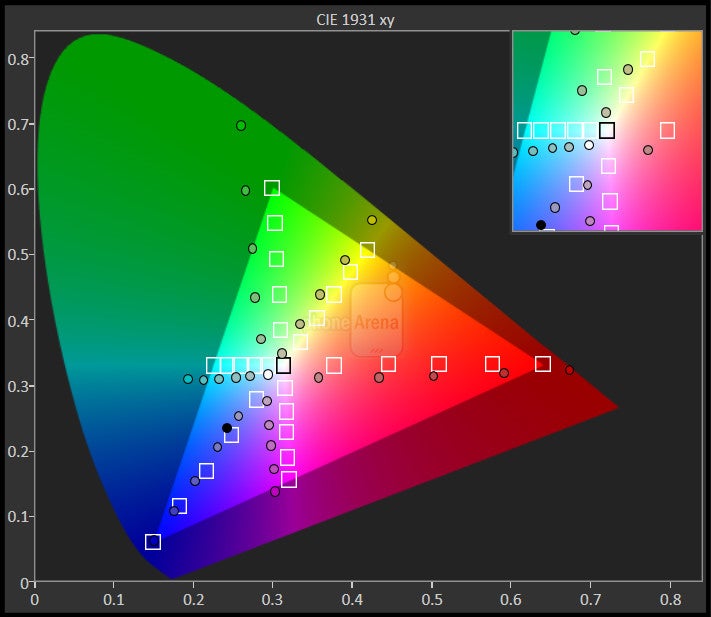
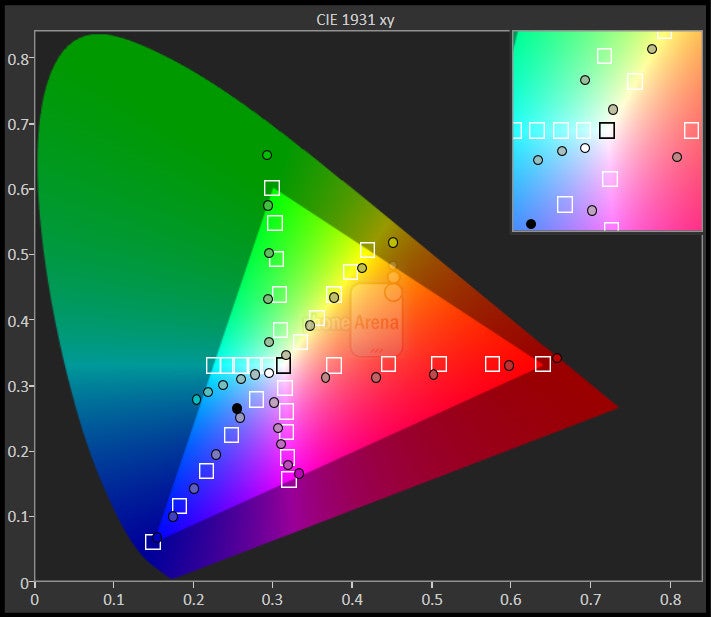
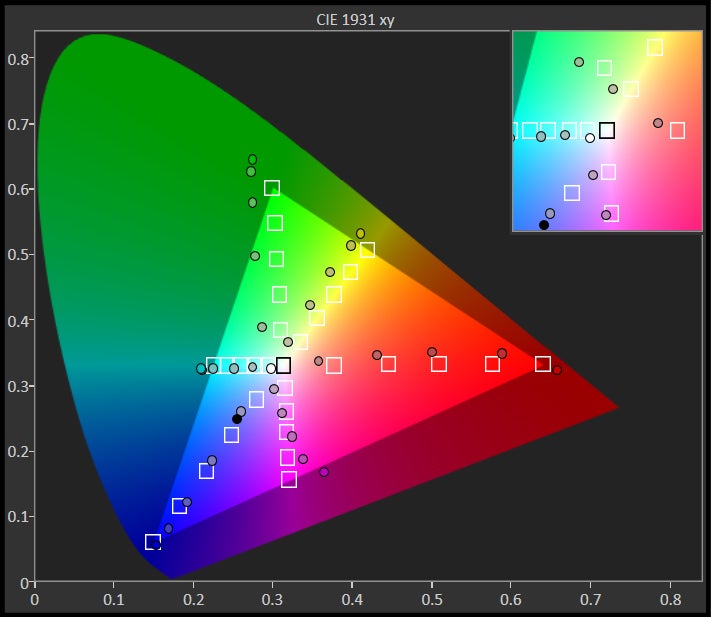
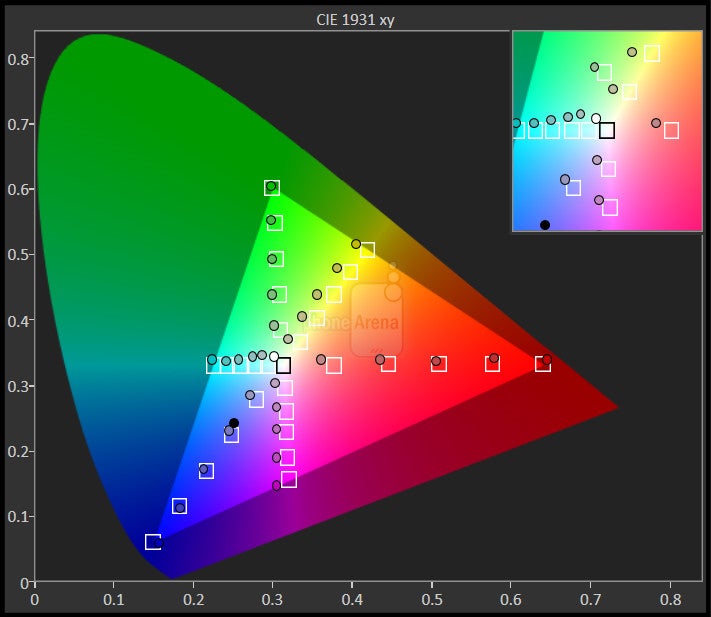
Colors really pop on this screen, though we can't say they're particularly accurate, with over-exaggerated, larger-than-life saturation. Some people really dig that look, and if you're among that group, the BB Motion should keep you happy. By default, color temperature's a little on the cool side, though you can dial that up a bit warmer if you so choose in display settings.




Interface and Functionality
Security continues to be BlackBerry's big software focus, and it generally feels successful

Much of BlackBerry's software on the Motion is stuff we've seen before: BBM, the Productivity Tab, DTEK security hub, and a healthy collection of useful shortcuts to common tasks and frequently-checked system settings.
The only downside here is that while it does support shortcuts to multiple apps at once, it does so via a pop-out on-screen menu, triggered when you press the button. While this works, it sort of defeats the purpose of a special hardware button; we'd have loved to see something like press-and-hold or double-press pull up alternate apps.
Processor and Memory
We're still in mid-range territory, even with an appreciated RAM bump

Much like the KEYone, the Motion isn't trying to win any performance awards, and the phone's silicon is decidedly in the mid-range spectrum. That said, today's mid-range can still be hella powerful, while also offering battery savings that more bleeding-edge devices can't touch.
Here, the phone runs on a Snapdragon 625 chip paired with 4GB of RAM. That's slightly more memory than the 3GB most of us got with the KEYone, thought we did find the Motion getting slightly lower scores in a number of benchmarks, possibly due to the higher screen resolution here.
The 32GB of internal storage isn't huge by any stretch. If you ever do need some room to grow, microSD support has got your back.
Connectivity
While already available internationally, the big question right now is what we can expect in terms of carrier support for a future US release. So far, we don't have anything official to report, but rumors suggest that quite a few big players could be involved, with AT&T, Sprint, and Verizon all named.
Camera
Though not particularly impressive, nor does the Motion's camera completely drop the ball

We can't imagine that many users go out to buy a BlackBerry phone specifically because they're looking for a handset with a great camera. That said, even if imaging is an afterthought, we'd still rather see it done well enough to snap a decent pic when the moment presents itself, rather than end up with a regrettably out-of-focus, noisy mess.
The good news is that even if the BlackBerry Motion is pushing any limits with its camera hardware, it's still respectably equipped, with an f/2.0 12MP main camera, and an f/2.2 8MP front-facer.
Image quality
Overall, pictures taken with the BlackBerry Motion tend to look OK. They're not the best we've seen, but also far from the worst, and for users not looking for much more than a serviceable point-and-shoot experience, the image quality, camera speed, and feature set here won't let them down.
Basically: don't ask too much from it, and you'll do just fine.
BlackBerry Motion sample images
Video recording
The Motion offers a good variety of filming modes, extending up to 4K @ 30fps, and with most of them looking pretty decent. Both video and sound quality are acceptable, though we did notice some distracting compression artifacts when filming at 60fps (available at 1080p and lower). There's electronic stabilization (again, at 1080p and below) available that does an alright job, though we've smoother output from other phones. Refocusing while filming can be a bit of a struggle, but for basic shots, the Motion should have you covered.
BlackBerry Motion Sample Videos
Multimedia
Even some middling audio performance doesn't really hurt the Motion's overall picture

Call Quality

Battery Life
Easily the best reason to pick up the Motion, with superior endurance to even the KEYone

With the KEYone, we may have initially picked the phone up due to its hardware keyboard, or to check out its unusual form factor, but we kept using it because of its incredible battery life. The combination of a good-sized 3,505mAh battery and low hardware power requirements gave that handset the ability to stretch its operating life north of twelve hours.
Not even. Instead, we saw battery life improve even further, now breaking the thirteen-hour barrier. While your particular usage patterns will impact just what kind of gains you can hope to see, this feels very much like a charge-every-other-day-phone.
Recharge times with the included adapter aren't bad either, taking right around two hours to fully power back up.
Conclusion

The Motion isn't so much a big step forward for the BlackBerry line as it is a revamped KEYone, only now without the hardware keyboard. And really, that's not the worst idea for a phone we've ever heard. While some users absolutely loved that keyboard, it was a pretty divisive feature, and if you thought it was ridiculous we'd be trading valuable screen real estate for something that could be implemented perfectly well in software – well, the Motion is just what you've been looking for.
But if you're buying the Motion for the right reasons, this package can still deliver, and that's especially true when we're talking about no-holds-barred battery life, easily stretching across days.
Perhaps the trickiest consideration to weigh with the Motion – and the KEYone had this same issue – is pricing. While there's some decent stuff here, and we appreciate upgrades like the waterproofing, we're still looking at a price tag that's likely going to be in the low-to-mid-$400 range when the phone lands in the States. And though that sounds like nothing when compared to a $1000 iPhone X, there are a number of other similarly-equipped mid-rangers near that price point.

Follow us on Google News









Things that are NOT allowed:
To help keep our community safe and free from spam, we apply temporary limits to newly created accounts: