Apple iPad Pro 12.9 Review

Update: You can now read our Apple iPad (2018) review!
Introduction
Sometimes “mobile” devices don't seem particularly mobile, and as our drive for more features, better battery life, and bigger screens influences the product offerings of manufacturers, we can easily find ourselves looking at larger and larger products.
Over the years, though, Apple's warmed to the idea of bigger and bigger screens on its mobile products, and that was made crystal clear back in 2015 as Apple refreshed its tablet lineup with its largest model yet, the 12.9-inch iPad Pro. Since the introduction of the tablet, we've seen the iPad Pro line return with new size options – and most recently, featuring an all-new 10.5-inch screen – but if you wanted the most room on an iOS device you could find, ready to enjoy your apps in larger-than-life sizes and take full advantage of the tablet's split-screen mode, the 12.9-inch model was your best bet.

In the box:
- iPad Pro 12.9
- Lightning to USB standard-A cable
- Wall charger
- Quick start guide
- Apple decals
Design

Apple's not a company to approach a new size option for one of its iconic product series lightly, and that's got to be all the more true when it's reaching out into uncharted waters with its largest tablet ever. So when it built the first 12.9-inch iPad Pro, the manufacturer seems to have ensured that it shipped with a design the company really, really likes. Perhaps as a result, the second-gen 12.9-inch iPad Pro leaves the tablet's build largely unchanged.
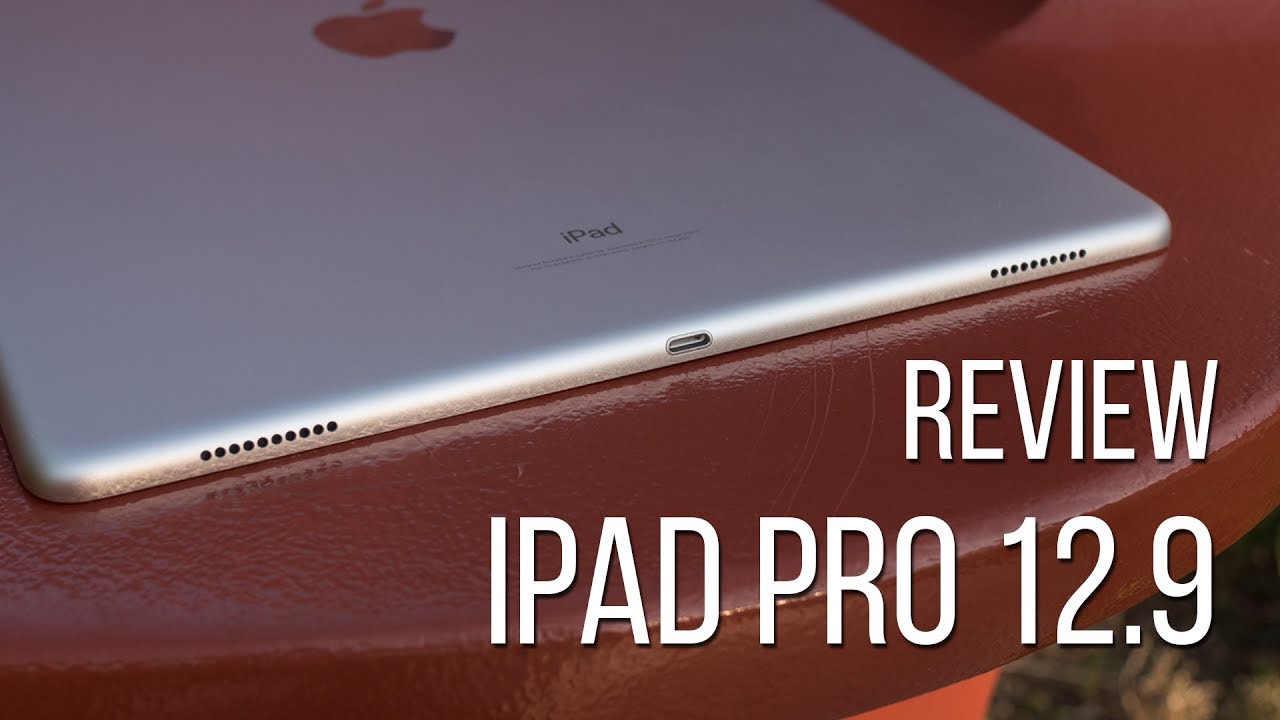
Compared to the original, we're looking at the same physical dimensions: a body measuring 305.7 by 220.6mm, and coming in at 6.9mm thick. That's slightly thicker than the 10.5-inch iPad Pro, but only by a fraction of a millimeter.
Apple offers the same sort of color options as it did with the original 12.9-inch iPad Pro. While the smaller iPad Pro hardware has been available in your choice of silver, space gray, gold, and rose gold, the 12.9-inch models – this new one included – only extend those options to include the first three, with no rose gold available.
Display
Bright and beautiful, but is it maybe TOO big to handle?
A new generation for any of Apple's mobile products is going to spell enhanced performance, thanks to the inevitable arrival of the company's latest A-series processors. But let's just pretend that's not the case for a moment. And since we just saw that the shape and size of the new 12.9-inch iPad Pro is essentially the same as we got the first time around, what else about this tablet represents a step forward from the first-gen model? Look no further than that big, expansive screen.

The 12.9-inch screen returns with the same 2048 x 2732 resolution it introduced back in 2015. And while that's obviously both bigger and higher-res than the display on the 10.5-inch model, both panels end up delivering precisely the same pixel density – so images should look just as sharp and detailed on either.
But we're here to talk about improvements, and both this and the new 10.5-inch iPad Pro feature screens employing what Apple's calling ProMotion, a technology that allows the screens on these devices to achieve refresh rates as high as 120Hz, for silky-smooth animation.
That sounds really good, but don't expect it to change every aspect of your iPad user experience. For while the screen's now capable of such high-refresh-rate feats, your actual ability to see them is going to pop up a little less frequently. For one, don't expect to see the sort of motion interpolation you get on some 120Hz television sets; videos are going to look just like they always did. And with many apps, too, you're probably going to see great frame rates as a result of the upgraded GPU, but don't hold your breath for something game-changing here.
Instead, expect more interface-driven improvements like smooth scrolling between screens. And while this review is focusing specifically on the new iPad Pro, and not accessories like the Apple Pencil, that higher refresh-rate should spell more natural-feeling input for users who do take advantage of such hardware.
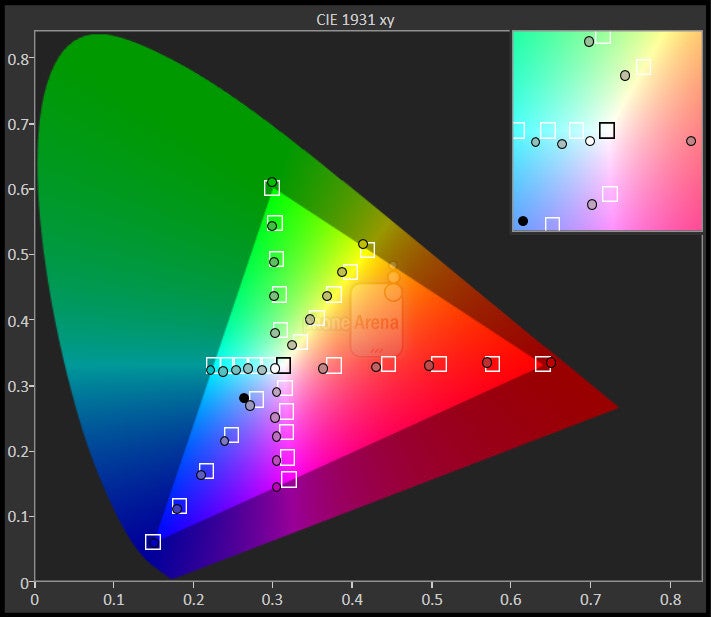
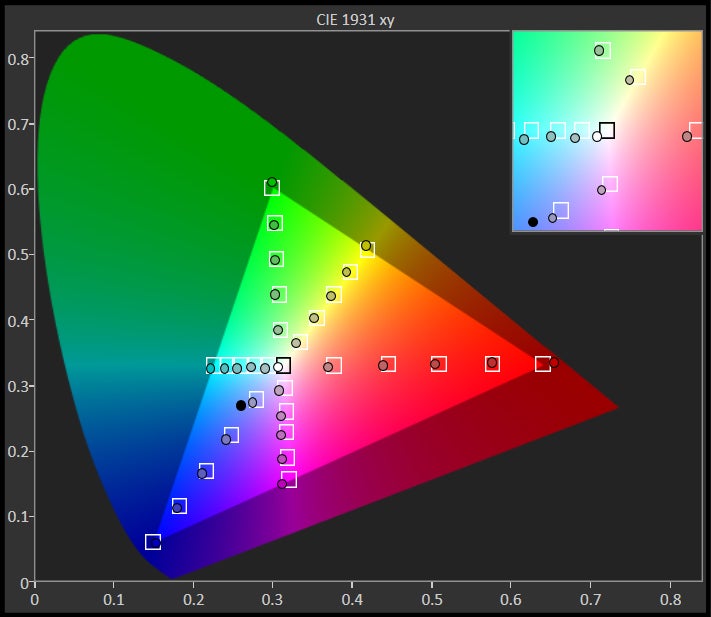
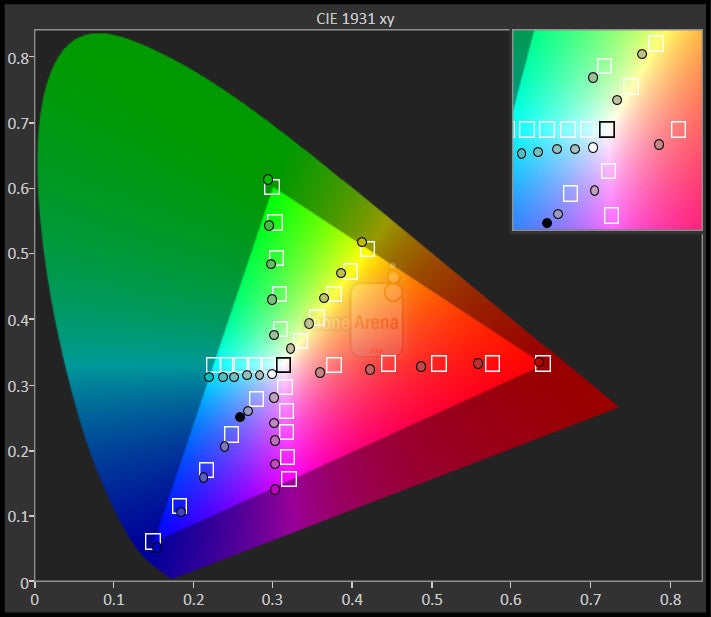
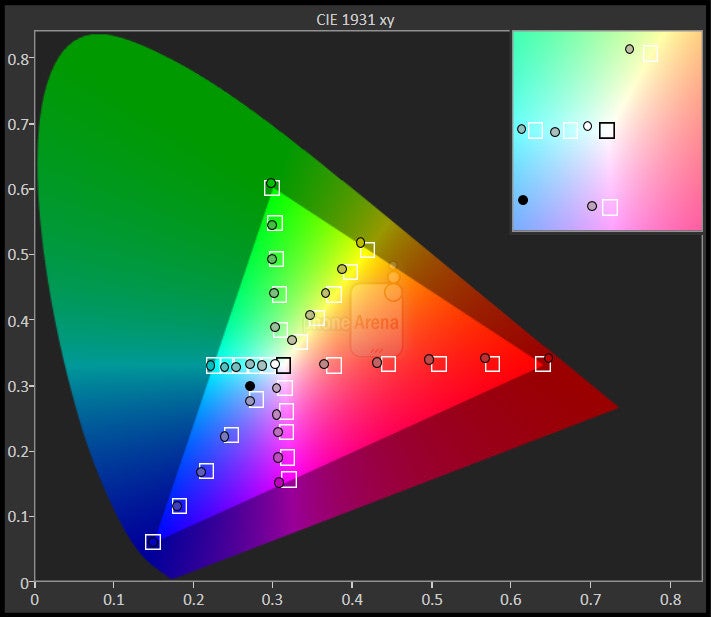
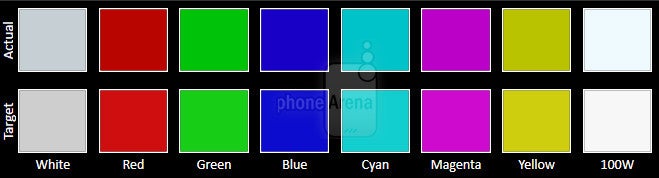
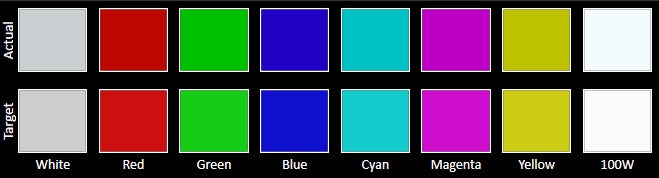
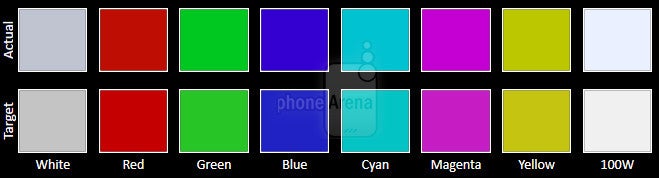
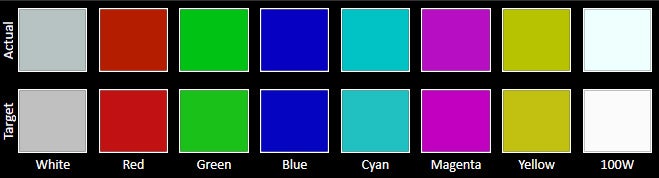
For all display measurements in this iPad Pro 12.9" review, we've used Portrait Displays' powerful CalMAN calibration software.




Interface and Functionality
Split-screen works better than on the smaller iPad Pro, but iOS still needs to be more tablet-friendly

Right now, there's not a lot unique and special going on with the interface you're going to find on the iPad Pro – if you're familiar with iOS 10 already, expect more of the same. Mind you, iOS 11 is just around the corner, and we can look forward to a number of upgrades and new features focused specifically on Apple's tablet lineup – but that's still a few months away.
For the moment, we can reflect on how Apple's mobile OS responds to larger-screen devices than the typical 9.7-inch iPad fare. On a very basic level, iOS still doesn't feel particularly optimized for tablets, and that's made clear the moment you power the tablet on and see the operating system's home screen with the same paltry 4 x 5 array of app icons you get on a much, much smaller iPhone display.
What works better is split-screen and picture-in-picture support, letting you view two apps side-by-side or superimpose a video thumbnail over another full-screen app. Compared to smaller iPad Pro models, the 12.9-incher does a much better job at handling split-screen displays, and when sharing screen space equally between two apps in landscape, you can still enjoy a full-sized interface on both – it's only when you shrink one down to smaller sizes that iOS is forced to start dropping UI elements as it renders apps for smaller screens.
With both of these features, though, we wish there were more flexibility. You're highly limited in terms of how you can resize apps, as well as video windows. And there's still the issue that PIP isn't supported at all in popular third-party apps like YouTube.
Processor and Memory
Apple delivers on its promise of big performance boosts over the first-gen iPad Pro

A new generation of iPads is more often than not an opportunity to get to know Apple's latest silicon, and that's very much the case this time around. For both the original 12.9-inch iPad Pro and the now-discontinued 9.7-inch edition, Apple used its A9X chip, which was already a quite powerful processor. With this new wave of tablets, the company's introducing the beefed-up A10X, which produces what Apple claims to be a 30 boost in processing power, and 40 percent increase to graphics computational speed.
That's not just a benchmark determination, either, and subjectively the iPad Pro is phenomenally fast. The speed has a way of sneaking up on you, not always leaving you aware of the improvements – and that's a very good thing. Rather than thinking to yourself, “my stars, this app is fast,” it's more like you don't think about the speed at all – things are just running so smoothly that you never see those slowdown moments that get you pondering performance bottlenecks in the first place.
In a select few benchmarks we saw the 12.9-inch iPad Pro performing worse than the 10.5-inch model, and with the tests in question being particularly graphics-focused, we're guessing the mitigating factor is this tablet's higher resolution. But this is really a minor issue, and for nearly every other test, the bigger iPad Pro performed at just the same level as the (slightly) more petite tablet.
As far as storage is concerned, Apple offers 64GB, 256GB, and 512GB editions of the tablet, starting at about $800, $900, and $1100 as WiFi-only editions, respectively. For the purposes of this review, we're looking at the 64GB model, but if we had to pick a sweet spot on that storage/pricing curve, 256GB is feeling like a pretty nice balance. All these models represent a $150 premium over the smaller 10.5-inch iPad Pro.
Connectivity

As per usual, Apple offers its latest iPads in both WiFi-only and cellular equipped models, and no matter which storage configuration you go with, opting for cellular connectivity will add $130 to your final cost.
But perhaps the more relevant connectivity concerns accessories, and as an iPad Pro model, this tablet supports both the Apple Pencil and the Smart Keyboard. While the former is obviously a wireless devices, the keyboard connects to the iPad Pro through a proprietary edge interface. We didn't evaluate the Smart Keyboard as part of this review, but if you want to pick one up, Apple's got its 12.9-inch model available for around $170 – only $10 more than the 10.5-inch iPad Pro Smart Keyboard.
Camera
Don't look twice, but this is the camera that might have you rethinking image-taking on tablets

The camera app on the Apple iPad Pro 12.9
Using a camera on a tablet can feel like the mobile-photography equivalent of wearing socks with sandals – and with Apple's largest iPad ever, that's all the more true. But just because it can be a little socially awkward doesn't mean it's not a useful feature to have – nor an area where it necessarily makes sense to skimp on hardware. And if you're of the better-off-being-prepared mentality, you'll be pleased to know that the latest iPad Pros have some exceptional camera components.
Apple gives this tablet a 12MP main camera with an f/1.8 aperture and optical stabilization – and if that package sounds familiar, it should, because it's the same setup we saw (and loved) on the iPhone 7. That phone (to say nothing of the dual-camera iPhone 7 Plus) offered an utterly fantastic image-taking experience; are we in for more of the same here? Let's take a look.
Image quality
Here's the weird thing about taking pictures with the 12.9-inch iPad Pro, its preposterous tablet size be damned: it's kind of fun. Sure, it can be more than a bit unwieldy (and even more so than with the 10.5-inch iPad Pro), and especially when you're dealing with a device this large, it's a bit weird to have the camera so tucked away in one corner, rather than in a more natural-feeling centered spot on the tablet's back, but there's a legitimate appeal to having a gargantuan viewfinder to work with: it just makes framing your shots and anticipating how they're going to turn out a bit easier.
Much of our same comments about the iPhone 7's camera apply here, and particularly, if you're used to super-saturated, high-contrast pics, there's a risk you'll interpret the iPad's camera output as slightly washed-out. Really, though, we don't think that's the case, and the camera here does do an admirable job of reflecting the real-world makeup of a scene, rather than to over-gloss it with heavy-handed processing. Also like the iPhone, the auto-HDR mode does a good job at salvaging otherwise complicated exposures, but the tablet's software is quite conservative in how it's deployed, saving its effects for when they matter post.
Apple iPad Pro 12.9 sample images
Video recording
As is the case for still-image photography on the 12.9-inch iPad Pro, your experience here is largely going to mirror what you get on an iPhone. We say “largely,” but there really is some divergence with video that's much less true with stills.
But there is a pronounced difference here and it's a negative one: the iPad isn't great when it comes to recording audio for your videos. That's a shame because they look really great, but the sound has a really far-away, muddled quality to it, almost like what you think things would sound like if you were recording underwater.
Apple iPad Pro 12.9 Sample Videos
Multimedia
The combo of a big screen and utterly fantastic speakers makes this iPad a joy to watch videos on
OK, we know the tablet has “Pro” in its name, and between the stylus and keyboard accessories available, is well equipped to handle all variety of serious, laptop-replacing business tasks. That's well and good, but sometimes you need to kick back with a little Netflix, or get caught up on the latest movie trailers – and if that's the afternoon you've got planned, the 12.9-inch iPad Pro is nicely outfitted to entertain.

The only downside there, and it's a small one, is the 3:2 aspect ratio of the tablet's screen, in a world where the vast majority of content being consumed is 16:9 widescreen. That's no huge problem, but it does make the iPad slightly less than ideal for video-watching. Then again, this is an issue that's existed since the dawn of Apple's tablet's existence – but just because it's familiar doesn't mean it's not worth mentioning.
While the 12.9-inch iPad is bordering on being uncomfortable large for a lot of uses, video consumption is definitely one where we appreciate having the larger display.
But this is all dancing around the big draw of consuming media on the iPad Pro: its speakers. The quad-speaker layout we were introduced to with the original iPad Pro is back, and it still sounds nothing short of phenomenal.
Beyond those four speakers always making sure that there's audio piping-out at the ideal angle for listening, they deliver some frequency coverage that sounds more in line with a dedicated stereo system than what you're used to expecting from a compact mobile device – and particularly, that comes though in the form of some really earthy, aurally satisfying bass reproduction.
And even if you need a little discretion in your audio consumption, the iPad Pro has you covered with a good-old analog headphone jack; Apple's efforts to re-write your expectations when it comes to headphone support haven't yet corrupted the company's tablet lineup.
Battery Life
Apple scores some impressive battery-life gains with this second-gen model

Compared to the original 12.9-inch iPad Pro, this new model is lighter-weight, despite being the very same size as its predecessor. Now, you wouldn't be wrong to worry that a situation like that could translate into a smaller battery – and with it, the likelihood of decreased battery life.
Luckily for us, though, Apple's pulled the neat trick of actually giving this new iPad Pro an ever-so-slightly larger battery then the first-gen model, bumping up capacity by around five percent to 10,875mAh.
The real story isn't about battery capacity, but the iPad Pro's increased efficiency. We don't know whether to credit the new processor, or changes to the display tech, but everything else being equal, we managed to squeeze out just under 11 hours of screen-on time from the new 12.9-inch tablet, a boost of several hours over the original model.
In addition to the battery lasting longer, recharge times are also improved, and while still quite lengthy, the four hours, twenty minutes it takes to bring the 12.9-inch iPad Pro's battery from depleted all the way back up to full is still a good half-hour improvement over the first-gen model's recharge times.
Conclusion

By all objective measures, the second-gen 12.9-inch iPad Pro is one of the best-performing tablets we've ever crossed paths with. It combines a brilliant display, powerful number-crunching capabilities, speakers that are far better than those that have any right being on a tablet, and even a best-in-class camera to create one of the most well-balanced tablets we've reviewed.
These are all things we said about the 10.5-inch iPad Pro, though. So which is the better device? Well, if you plan on using the tablet as a laptop replacement, pairing it with Apple's stylus and keyboard, we understand how it would make sense to go with this model. The bigger screen is going to be easier on the eyes in the long run, and especially with the tablet enhancements due in iOS 11, you're set to get a lot of productivity out of this device.
But if what you really want is a tablet – not a makeshift laptop – the 12.9-inch iPad Pro tends to feel a bit too big. It's unwieldy to carry, even in some bags, and while it works well when placed flat on a table, if you like holding your tablet in one hand while you interact with it with the other, you may be in for some arm strain.
For some users, this will be less of an issue than for others, but with nearly everything else being equal, we're really feeling more of a draw to the smaller 10.5-inch iPad Pro. Beyond giving you most of what you get here, the $150 savings are nothing to shake a stick at, either.
With the physical presence of this tablet being such an important factor in evaluating whether it's right for you, you're probably going to want to swing by the Apple store and feel this iPad in person before making your purchase. It's a big leviathan of a tablet, but with so much power packed inside, absolutely not one that puts its size to waste.
Update: You can now read our Apple iPad (2018) review!

Follow us on Google News








Things that are NOT allowed:
To help keep our community safe and free from spam, we apply temporary limits to newly created accounts: